
Shipping software faster only helps if the releases hold up. When a team pushes weekly but still runs a two-week manual regression pass, testing becomes the bottleneck that quietly stalls everything else. That is the gap test automation services are built to close. At KKRF Group, an enterprise software development company, we build automated testing suites that let engineering teams release often without trading away quality — and this guide walks through how those services work, what they cost, and how to judge whether a provider is worth hiring.
Key Takeaways
- Test automation services design, build, and maintain automated test suites so software can be validated on every code change instead of once per release.
- The biggest gains show up in regression testing, where automated suites typically pay back their build cost after roughly four to six release cycles.
- Tooling depends on the target: Selenium, Playwright, and Cypress for web; Appium for mobile; REST-assured and Postman for APIs; k6 or JMeter for performance.
- Expect project pricing from about $15,000 for a focused suite to $150,000+ for enterprise-wide automation, or roughly $2,500–$12,000 per month for a managed QA automation team.
- A healthy suite follows the automation pyramid — mostly fast unit and API tests, few brittle end-to-end tests — and is integrated into CI/CD so failures surface within minutes.
On This Page
- What Are Test Automation Services?
- Test Automation, Defined
- What Test Automation Services Include
- Test Automation Tools & Frameworks Compared
- How to Structure a Suite: The Automation Pyramid
- How an Engagement Works, Step by Step
- Manual vs Automated Testing
- How Much Test Automation Costs in 2026
- The ROI and Business Case
- Continuous Testing Inside CI/CD
- Security & Compliance Test Automation
- Common Test Automation Mistakes
- When to Automate (and When Not To)
- How to Evaluate a Test Automation Partner
- Where Test Automation Is Heading
- Frequently Asked Questions
What Are Test Automation Services?
Test automation services are engineering engagements in which a specialist team designs, builds, and maintains automated tests that check whether software works correctly — running those checks automatically every time the code changes. Instead of a person manually clicking through an application before each release, scripted tests execute in minutes inside the build pipeline and flag regressions before they reach users. The service usually spans strategy, framework setup, script development, integration with CI/CD, and ongoing maintenance so the suite stays reliable as the product evolves.
In short: you get faster, more repeatable quality checks, wider test coverage, and quicker feedback for developers — without hiring and managing an in-house automation team from scratch.
KKRF Group has built and stabilized automation suites for web platforms, mobile apps, and API-heavy backends across regulated and high-growth environments. Our approach is deliberately practical: we automate the tests that repay the effort, keep the suite fast enough to run on every commit, and treat test code with the same engineering discipline as production code. What follows reflects how we scope, price, and run these engagements.
Test Automation, Defined
Test automation is the practice of using software to run tests against other software, comparing actual results to expected results without a person driving each step. A test is written once as code, then executed on demand — on a schedule, or automatically whenever developers push a change.
A few terms come up constantly, so here are self-contained definitions:
Regression testing is re-running existing tests to confirm that new code has not broken features that already worked. It is the single largest source of repetitive testing effort, which makes it the first thing most teams automate.
A test automation framework is the structured foundation — libraries, conventions, and reusable helpers — that scripts are built on. A good framework keeps tests readable, reduces duplication, and makes maintenance affordable as the suite grows.
Continuous testing means automated tests run as an integrated part of the CI/CD pipeline, giving developers a pass or fail signal within minutes of committing code.
Flaky tests are tests that pass and fail intermittently without any real change in the software, usually due to timing or environment issues. Flakiness erodes trust in the suite and must be controlled aggressively.
What Test Automation Services Include
The label covers more than “writing scripts.” A complete engagement usually bundles several distinct services, and a strong provider is transparent about which of these you are buying.
- Automation strategy and assessment. An audit of your current testing, release cadence, and risk areas to decide what should be automated first and what should stay manual.
- Framework design and setup. Selecting the tooling and building a maintainable foundation — page objects or component models, test data handling, reporting, and parallel execution.
- Test script development. Writing the actual automated tests across the layers that matter: unit support, API and integration tests, and targeted end-to-end flows.
- CI/CD integration. Wiring the suite into pipelines such as GitHub Actions, GitLab CI, or Jenkins so tests run on every pull request and block bad merges.
- Cross-browser and device coverage. Running tests across browsers and real or emulated devices, often via a cloud grid, to catch environment-specific defects.
- Maintenance and stabilization. Fixing flaky tests, updating selectors, and keeping the suite green — the ongoing work that quietly determines whether automation succeeds or rots.
We treat that last item as first-class work rather than an afterthought. An automation suite nobody trusts is worse than no suite at all, because teams start ignoring red builds. Keeping tests fast and stable is where a lot of the real value of a software testing services partner shows up over time.
Test Automation Tools & Frameworks Compared
Tool choice follows the target under test, not fashion. Web, mobile, API, and performance testing each have their own strong options, and mixing them in one suite is normal. The table below maps the tools we reach for most often to where they fit.
| Tool / Framework | Primary Use | Strengths | Best Fit |
|---|---|---|---|
| Selenium | Web UI (cross-browser) | Mature, huge ecosystem, every language | Legacy and multi-browser web apps |
| Playwright | Web UI + API | Fast, auto-waiting, built-in parallelism | Modern web apps and teams wanting reliability |
| Cypress | Web UI (developer-centric) | Great DX, time-travel debugging | Front-end teams testing single-page apps |
| Appium | Mobile (iOS + Android) | Cross-platform, real-device support | Native and hybrid mobile apps |
| REST-assured / Postman | API & integration | Fast, stable, close to business logic | Service and contract-level testing |
| k6 / JMeter | Performance & load | Scriptable load at scale | Throughput, latency, and stress testing |
Two practical notes. First, API and integration tests give the best return per hour of effort because they are fast and far less brittle than UI tests — we lean on them heavily. Second, “scriptless” or AI-assisted tools can speed up authoring, but they do not remove the need for engineering judgment about what to test and how to keep the suite maintainable.
How to Structure a Suite: The Automation Pyramid
The test automation pyramid is a model for how to distribute tests across layers so a suite stays fast and affordable. The idea is simple: put most of your tests where they are cheap and quick to run, and use very few of the slow, fragile ones.
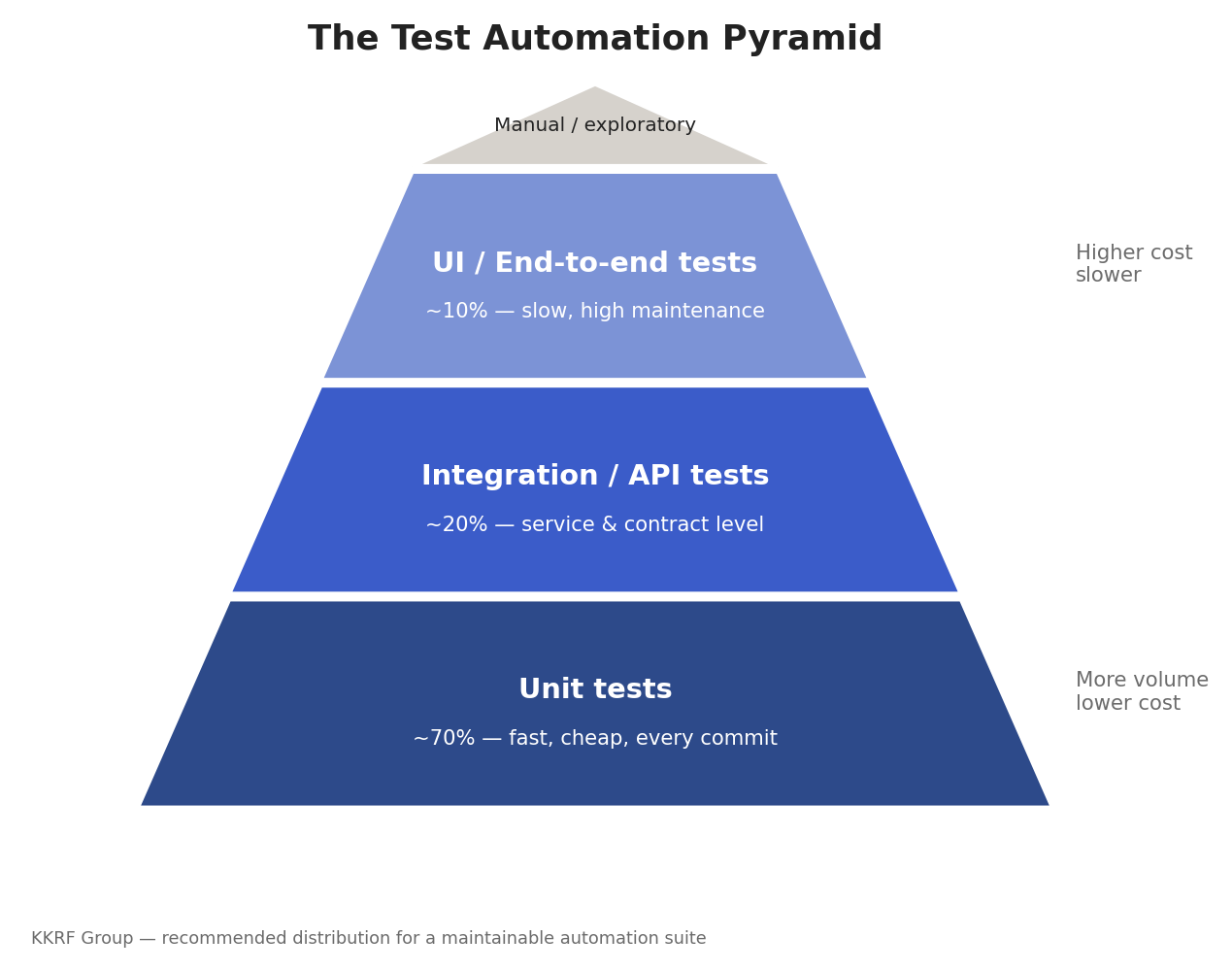
A well-balanced suite is roughly seventy percent unit tests, twenty percent integration and API tests, and ten percent end-to-end UI tests, with a thin cap of manual exploratory testing on top. Teams that invert this — piling on UI tests because they feel thorough — end up with slow pipelines and constant flakiness. When we stabilize a struggling suite, rebalancing toward the middle and bottom of the pyramid is often the highest-impact change we make.
How an Engagement Works, Step by Step
Most successful automation projects follow a similar arc. Here is the sequence we use, framed so each step stands on its own.
- Assess and prioritize. Review the application, release process, and defect history to identify high-risk, high-repetition flows. These become the first automation targets.
- Choose tooling and design the framework. Select tools per layer, then build a maintainable foundation with reusable components, test data management, and clear reporting.
- Automate a thin, valuable slice. Ship a small suite covering the most important regression paths first, proving value before scaling breadth.
- Integrate into CI/CD. Wire tests into the pipeline so they run on every pull request, with fast feedback and clear failure diagnostics.
- Expand coverage. Grow the suite across features and layers, keeping the pyramid balanced and execution time in check.
- Stabilize and maintain. Track flakiness, fix brittle tests, and refactor as the product changes so the suite stays trustworthy.
Notice that CI/CD integration comes early, not last. A test that only runs on someone’s laptop rarely gets run. Putting automation in the pipeline from the start is what turns it into a genuine safety net.
Manual vs Automated Testing
Automation does not replace manual testing — it redirects it. Repetitive, predictable checks are ideal for automation. Judgment-heavy work like exploratory testing, usability review, and first-time validation of a brand-new feature stays with people. The goal is to stop wasting skilled testers on rote regression they could be spending on harder problems.
| Factor | Manual Testing | Automated Testing |
|---|---|---|
| Speed per run | Slow, human-paced | Minutes, runs in parallel |
| Upfront cost | Low | Higher (build the suite) |
| Cost per repeat | High and recurring | Near zero |
| Best for | Exploratory, UX, new features | Regression, smoke, data-driven checks |
| Consistency | Varies by tester | Identical every run |
| Scales with releases | Poorly | Very well |
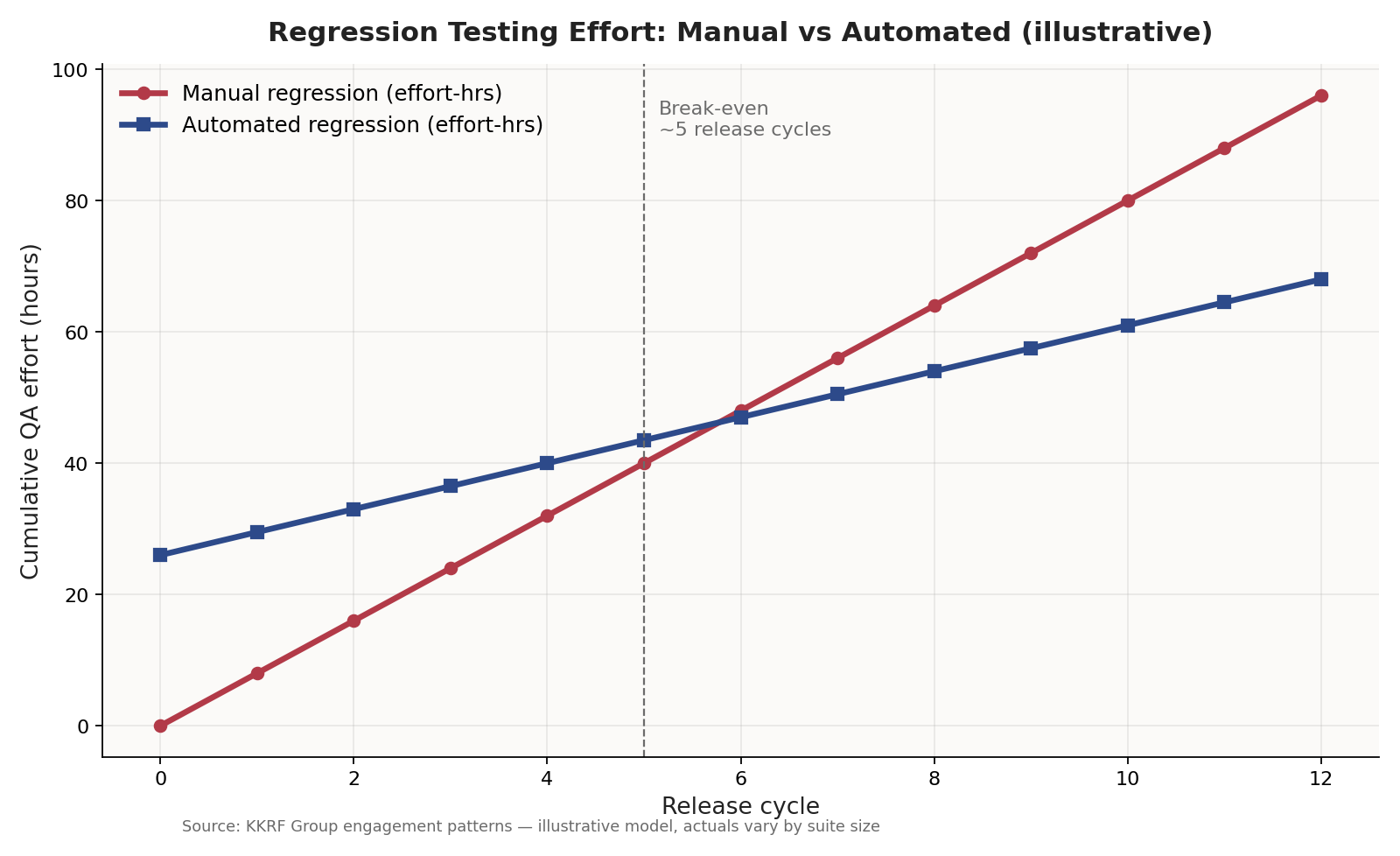
The economics flip with repetition. A manual regression pass costs the same every single release; an automated one costs a lot to build and almost nothing to re-run. That crossover — usually somewhere around four to six release cycles — is why fast-moving teams automate regression first and hardest.
How Much Test Automation Costs in 2026
Pricing varies widely because “test automation” can mean a two-week framework setup or a multi-year quality engineering program. That said, most engagements fall into a few recognizable bands. Treat these as planning ranges, not quotes — actual figures depend on application complexity, coverage goals, and how much your suite already exists.
| Engagement Type | Typical Range | What You Get |
|---|---|---|
| Framework setup + starter suite | $15,000 – $35,000 | Tooling, framework, core regression paths, CI/CD wiring |
| Full project automation | $40,000 – $150,000+ | Broad coverage across web/mobile/API for a product |
| Managed QA automation team | $2,500 – $12,000 / month | Dedicated engineers building and maintaining suites |
| Per automation engineer | $25 – $75 / hour | Blended offshore/nearshore rates, region-dependent |
The cost drivers worth watching: how many end-to-end tests you insist on (the expensive, brittle kind), how much test data and environment setup is needed, and how stable the application UI is. A UI that changes weekly makes maintenance the dominant cost. This is closely tied to overall software development cost, since testing effort scales with the size and churn of the codebase.
The ROI and Business Case
The return on test automation is not really about saving QA salaries — it is about release velocity and risk. When a suite runs in minutes on every commit, developers get feedback while the code is still fresh in their heads, defects are caught before they compound, and releases stop being high-stress events.
Three effects usually drive the business case. Faster releases mean features reach customers sooner. Fewer production defects mean less expensive firefighting and fewer hotfixes. And predictable quality reduces the reputational cost of visible bugs. A useful rule of thumb from research and our own engagements: a defect caught in development costs a fraction of the same defect caught in production, where it may involve incident response, customer impact, and emergency deployment.
Automation is an investment with an upfront cost and a compounding payoff. The teams that get the most out of it are the ones releasing frequently, because that is where the “run it again for almost nothing” advantage pays off cycle after cycle. For organizations undergoing broader digital transformation, dependable automated testing is often the foundation that makes rapid, continuous delivery safe.
Not sure which tests are worth automating first? Our engineers can review your suite and release process and map the highest-ROI targets. Start with a quick technical assessment.
Get a Technical Assessment →Continuous Testing Inside CI/CD
Continuous testing is where automation earns its keep. The suite is embedded in the CI/CD pipeline so that every pull request triggers the relevant tests automatically, and a failing test blocks the merge before broken code reaches the main branch.
A practical setup runs fast unit and API tests on every commit, a broader regression set on each pull request, and the slower end-to-end suite on a schedule or before release. Splitting tests this way keeps feedback quick without sacrificing coverage. Tools like GitHub Actions, GitLab CI, and Jenkins orchestrate this, while a cloud device grid handles cross-browser and cross-device runs in parallel. Well-run software engineering teams treat a red pipeline as a stop-the-line event, not a suggestion.
Security & Compliance Test Automation
Functional correctness is only part of quality. Automated security and compliance checks catch a different class of problems — and increasingly they run in the same pipeline as functional tests.
- Static analysis (SAST) scans source code for known vulnerability patterns on every build.
- Dependency scanning flags known-vulnerable third-party libraries before they ship.
- Dynamic analysis (DAST) probes the running application for issues such as injection or broken access control, guided by frameworks like the OWASP Top 10.
- Compliance checks assert configuration and data-handling rules relevant to standards such as SOC 2, HIPAA, or GDPR.
For regulated industries, automating these checks is not a nice-to-have. It produces a repeatable, auditable trail that manual review struggles to match, and it catches regressions in security posture the moment they are introduced.
Common Test Automation Mistakes
Most automation failures are not tooling problems. They are strategy problems. These are the patterns we see most often when we are called in to rescue a suite.
- Automating everything. Trying to automate 100% of tests, including one-off and rapidly changing flows, produces a bloated, high-maintenance suite. Automate what repeats and matters.
- Too many UI tests. Over-investing in slow end-to-end tests inverts the pyramid and guarantees flakiness. Push logic down to API and unit levels.
- Ignoring flaky tests. Tolerating intermittent failures trains the team to ignore red builds, which destroys the suite’s value.
- No maintenance budget. Treating automation as a one-time project rather than living code. Suites need continuous upkeep as the product changes.
- Poor test data management. Tests that depend on fragile shared data break constantly. Reliable suites control their own data.
- Skipping CI/CD integration. Tests that do not run automatically get forgotten. Integration is what makes automation a habit rather than a hope.
When to Automate (and When Not To)
Automation is a means, not a trophy. This framework helps decide where it genuinely pays off.
Automate when
- A test is run repeatedly across releases (regression, smoke, sanity).
- The application has stable, well-defined behavior worth locking in.
- You release frequently and need fast feedback in the pipeline.
- The check is data-driven and benefits from many input combinations.
- Manual execution is slow, tedious, or error-prone.
Think twice when
- The feature is a throwaway experiment or changes weekly.
- The test needs human judgment — visual polish, usability, “does this feel right.”
- You would spend more maintaining the test than running it manually.
- The application is a short-lived prototype with no long-term suite.
Our recommendation: start with regression and smoke tests for your most critical user journeys, get them running in CI/CD, and expand from that stable base. Resist the urge to chase a coverage percentage — a lean, trustworthy suite beats a large, ignored one every time. This is exactly the balance a mature product engineering practice aims for.
How to Evaluate a Test Automation Partner
Hiring a test automation services provider is really hiring an engineering discipline. The questions that separate strong partners from weak ones are practical, not glossy.
- How do you decide what to automate? You want a risk-based answer, not “everything.” A partner that automates indiscriminately will hand you a maintenance burden.
- Who owns the test code, and how maintainable is it? Ask to see a sample framework. Readable, well-structured test code is a leading indicator of long-term success.
- How do you handle flakiness? A credible team has a concrete process for detecting and quarantining flaky tests, not a shrug.
- How will this integrate with our CI/CD? Automation that lives outside the pipeline delivers a fraction of the value.
- What does handover look like? You should be able to run, understand, and extend the suite yourself — no lock-in.
- Can you show measurable outcomes? Reduced regression time, faster releases, fewer escaped defects — real metrics beat testimonials.
As a trusted global technology partner, KKRF Group builds suites you own outright, with the framework, documentation, and CI/CD integration handed over cleanly. We would rather leave a client self-sufficient than dependent — long-term partnerships are built on trust, not lock-in.
Where Test Automation Is Heading
Several shifts are reshaping how automated testing gets done, and they are worth factoring into any tooling decision made today.
- AI-assisted authoring and self-healing. Machine learning is helping generate tests and auto-update selectors when the UI changes, cutting maintenance — though human review of what gets tested remains essential.
- Shift-left and shift-right. Testing is moving earlier (into development) and later (into production monitoring and synthetic checks) at the same time.
- Codeless and low-code tools. These widen who can contribute tests, while engineering-grade frameworks still handle the complex cases.
- API-first testing. As architectures fragment into services and microservices, contract and API testing is becoming the center of gravity for reliable suites.
The through-line: automation is getting easier to start and harder to do well at scale. Tooling lowers the barrier to entry; engineering judgment still determines whether a suite stays fast, trustworthy, and worth running.
Test automation is one of the highest-leverage investments a software team can make — but only when it is scoped with discipline. Automate the repetitive, high-risk checks first, keep the suite balanced and fast, wire it into CI/CD, and budget for maintenance. Do that, and testing stops being the thing that slows releases down and becomes the safety net that lets you speed them up.
Ready to build a suite your team actually trusts? KKRF Group designs, builds, and hands over maintainable automation integrated into your pipeline. Talk to our engineering team about your testing goals.
Talk to Our Engineering Team →Frequently Asked Questions
What are test automation services?
Test automation services are engineering engagements where a specialist team designs, builds, and maintains automated tests that validate software automatically whenever the code changes. They typically include strategy, framework setup, script development, CI/CD integration, and ongoing maintenance.
How much do test automation services cost in 2026?
A focused framework and starter suite usually runs about $15,000 to $35,000, full project automation ranges from roughly $40,000 to $150,000 or more, and a managed QA automation team costs about $2,500 to $12,000 per month. Actual pricing depends on application complexity, coverage goals, and UI stability.
Which tools are best for test automation?
It depends on the target. Selenium, Playwright, and Cypress lead for web UI; Appium covers mobile; REST-assured and Postman handle APIs; and k6 or JMeter drive performance testing. Most real suites combine several tools across these layers.
What is the ROI of test automation?
The main returns are faster releases, fewer production defects, and predictable quality. Automated regression usually pays back its build cost after roughly four to six release cycles, because re-running an automated suite costs almost nothing while a manual pass costs the same every release.
Does test automation replace manual testing?
No. Automation handles repetitive, predictable checks like regression and smoke tests, freeing skilled testers for exploratory testing, usability review, and validating brand-new features that need human judgment. The two are complementary.
When should you not automate a test?
Avoid automating throwaway experiments, features that change weekly, checks that need human judgment such as visual or usability review, and short-lived prototypes. In those cases maintenance often costs more than the test saves.
Whether you are starting from zero or stabilizing a flaky suite, we can help you get to fast, reliable, pipeline-integrated testing. Request a consultation with KKRF Group.
Request a Consultation →