
Good design is not decoration. It is the difference between an app people abandon in the first minute and one they keep coming back to. At KKRF Group, a trusted UI/UX design and product engineering partner, we’ve watched a single onboarding redesign lift activation by double digits — and we’ve seen polished interfaces fail because nobody tested them with real users. This guide breaks down what UI/UX design services actually cost in 2026, how the design process works, and how to pick a partner who ships outcomes, not just screens.
Quick Answer: What UI/UX Design Services Cost and Include
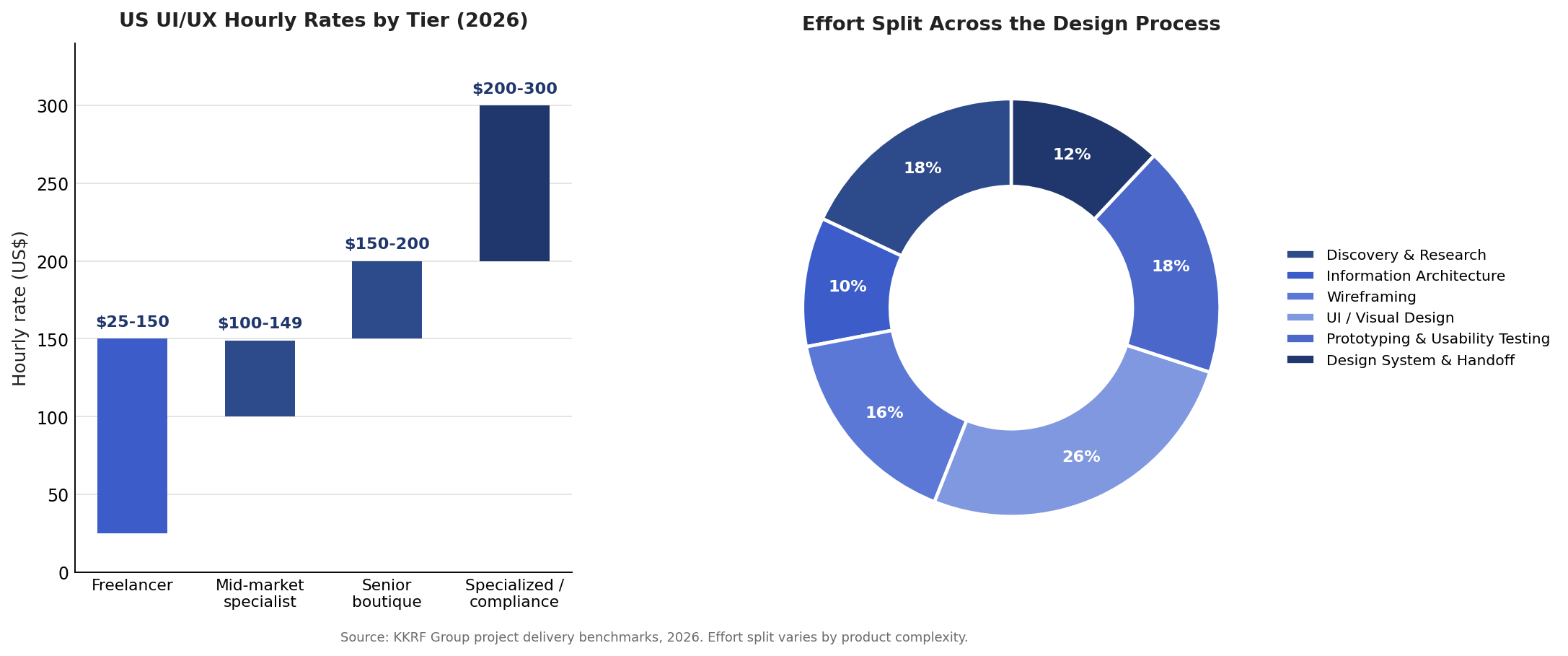
UI/UX design services in 2026 typically cost $3,000 to $150,000+ per project, with US agencies billing $100–$300 per hour and freelancers $25–$150 per hour. A focused website design runs $8,000–$45,000 with an agency, while a full mobile app UI/UX project runs $25,000–$80,000. These services cover user research, information architecture, wireframing, visual (UI) design, interactive prototyping, usability testing, and a reusable design system handed to your engineers. Price scales with the number of screens, product complexity, and compliance requirements.
Key Takeaways
- UI/UX design services in 2026 range from $3,000 to $150,000+; agency hourly rates sit at $100–$300.
- Three pricing models dominate: project-based, hourly, and monthly retainer (from ~$5,000/month).
- The core process runs seven stages, from discovery and research through usability testing to design-system handoff.
- Compliance-heavy industries — fintech and healthcare — cost the most because of accessibility and audit overhead.
- Choose a partner on research rigor, a testable prototype, a real design system, and clean developer handoff — not portfolio gloss alone.
What This Guide Covers
- Quick Answer: Cost & Scope
- What Are UI/UX Design Services?
- 2026 Cost Breakdown
- Pricing Models Explained
- The Design Process, Step by Step
- Deliverables, Tools & Systems
- Freelancer vs Agency vs In-House
- Mistakes That Waste Budget
- The Business Case: UX ROI
- How to Choose a Partner
- Design Trends for 2026
- Frequently Asked Questions
We build design the way we build software: with a clear brief, measurable goals, and engineering considered from day one. As a product design and software engineering company, KKRF Group treats UI/UX as part of the product, not a coat of paint applied at the end. That means research that questions assumptions, prototypes we can put in front of real users, and a design system your developers can implement without guesswork.
What Are UI/UX Design Services?
UI/UX design services are professional offerings that shape how a digital product looks, feels, and behaves so people can use it easily and want to come back. The work splits into two connected disciplines. User experience (UX) design decides how a product is structured and how it flows. User interface (UI) design decides how each screen looks and how users interact with it. Strong products need both working together.
UX design is the practice of researching user needs and structuring a product so tasks are logical, fast, and frustration-free. It covers user research, information architecture, user flows, wireframes, and usability testing. The goal is a product that works the way people expect.
UI design is the practice of crafting the visual and interactive surface of a product: layout, color, typography, iconography, spacing, states, and motion. It turns validated wireframes into polished, on-brand screens that communicate clearly and feel effortless to touch or click.
A full UI/UX engagement usually bundles both, plus a design system so the look and behavior stay consistent as the product grows. Some teams also fold in product strategy, accessibility audits, content design, and design-to-development handoff. The exact scope is what drives the price, which is where most budgeting conversations start.
Here’s a distinction we repeat with clients: UI is what users see, UX is what users feel. A checkout can look gorgeous and still lose sales if the steps are confusing. Design services exist to fix both halves of that equation, backed by evidence rather than opinion. Professional UI/UX design services exist to fix both halves of that equation with evidence, and accessibility standards such as the W3C WCAG guidelines keep those decisions inclusive.
How Much Do UI/UX Design Services Cost in 2026?
The price of UI/UX design services depends on three things above all: how many screens and flows the product has, how complex those flows are, and whether the industry carries compliance weight. Across the 2026 US market, agency projects commonly land between $8,000 and $150,000, while smaller website or single-feature engagements can start near $3,000. The table below shows realistic ranges by project type for both freelancers and agencies.
| Project Type | Freelancer | Agency | What Drives the Price |
|---|---|---|---|
| Website / landing page redesign | $1,000–$10,000 | $8,000–$45,000 | Page count, brand system, responsive states |
| Mobile app UI/UX | $8,000–$40,000 | $25,000–$80,000 | Number of screens, user flows, design system |
| E-commerce UX | $6,000–$25,000 | $20,000–$70,000 | Catalog depth, checkout, personalization |
| SaaS / dashboard | $7,000–$30,000 | $25,000–$90,000 | Data density, roles, complex interactions |
| Fintech (compliance) | $10,000–$45,000 | $25,000–$80,000 | Security UX, KYC, accessibility, audits |
| Healthcare UX | $12,000–$55,000 | $30,000–$100,000+ | HIPAA workflows, accessibility, clinical review |
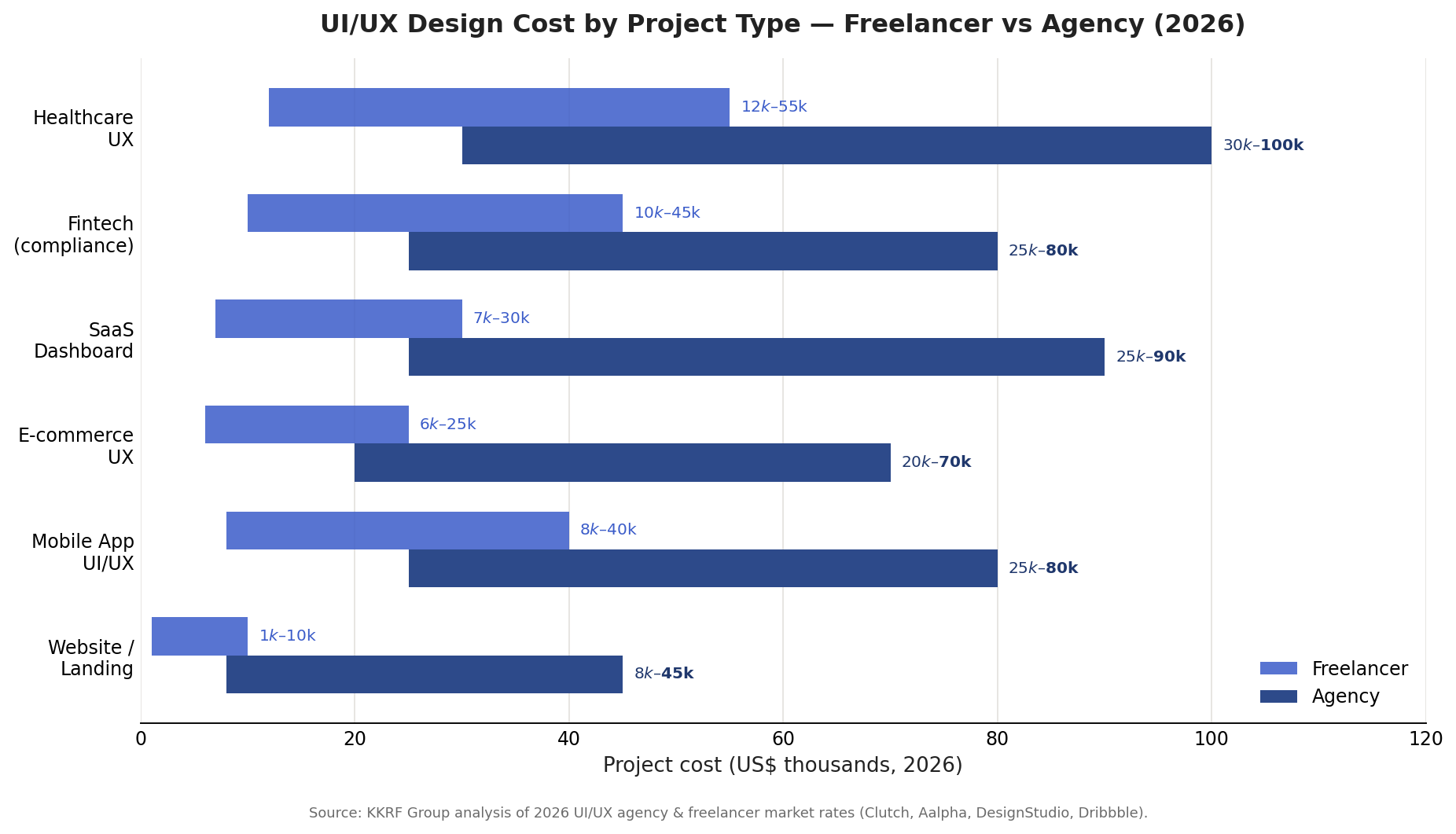
Two industries sit at the top for a reason. Fintech UI/UX design commonly costs $25,000–$80,000 and healthcare UX $30,000–$100,000 or more, because both demand rigorous accessibility, tighter security patterns, and additional review cycles. That extra cost is not padding — it is the price of designing flows that regulators and auditors will accept.
UI/UX Design Pricing Models: Hourly, Fixed, and Retainer
Beyond the raw number, how you pay shapes flexibility and risk. Design partners generally offer three engagement models, and the right one depends on how well-defined your scope is.
A retainer is a recurring monthly fee that reserves a design team for ongoing work. Retainers start around $5,000/month with smaller studios and run $15,000–$25,000/month for full-service agencies. They suit products that ship continuously and need design available every sprint.
| Model | Typical Range (2026) | Best For | Trade-off |
|---|---|---|---|
| Project-based (fixed) | $3,000–$150,000+ | Defined scope, clear deliverables | Change requests cost extra |
| Hourly | $100–$300/hr (agency) | Evolving or exploratory work | Harder to predict total cost |
| Monthly retainer | $5,000–$25,000/mo | Continuous product development | Pay even in slower months |
Our rule of thumb: if you can write a tight brief, fixed-price protects your budget. If the problem is still fuzzy, start hourly or with a short discovery sprint, then move to fixed once scope is clear. Retainers make sense once design becomes a permanent part of your delivery rhythm.
The UI/UX Design Process, Step by Step
A dependable UI/UX design process runs in seven stages. Each stage produces something concrete you can review, so you are never paying for invisible work. The order matters: research shapes structure, structure shapes screens, and testing validates the whole thing before engineers write code.
Step 1 — Discovery and research. The team learns your business goals, users, and constraints through stakeholder interviews, user interviews, competitor analysis, and analytics review. This stage surfaces real pain points and prevents the expensive mistake of designing for assumptions instead of evidence.
Step 2 — Information architecture. Findings become structure. Designers map content, features, and navigation into a logical hierarchy so users can find what they need without thinking. Good information architecture is invisible when it works and infuriating when it doesn’t.
Step 3 — Wireframing. Low-fidelity layouts define where elements go before any color or polish is added. Wireframes are cheap to change, which is exactly the point — you resolve layout and priority debates on paper, not in production.
Step 4 — UI and visual design. Approved wireframes turn into high-fidelity screens with brand color, typography, iconography, spacing, and interaction states. This is where the product gets its personality and where visual hierarchy guides the eye toward the actions that matter.
Step 5 — Prototyping. Screens are wired into an interactive prototype that behaves like the real product. Clickable prototypes let stakeholders and users experience flows early, so feedback is grounded in something tangible rather than a static image.
Step 6 — Usability testing. Real users attempt real tasks while the team watches for confusion, dead ends, and unclear labels. Observing five to eight users typically reveals the majority of serious usability problems, which are then fixed before development starts.
Step 7 — Design system and handoff. Final designs are packaged into a reusable design system — components, tokens, and guidelines — and handed to engineers with specifications and assets. Clean handoff is where design either accelerates development or quietly derails it.
Not sure how much design your product actually needs? A short discovery session with our team turns a vague idea into a scoped, priced plan. See how KKRF approaches product design and engineering.
Book a Discovery Call →What You Actually Get: Deliverables, Tools, and Design Systems
A UI/UX engagement should end with more than pretty pictures. The deliverables are working assets your team uses for months or years. Knowing what to expect protects you from vague scopes and half-finished handoffs.
- Research artifacts — user personas, journey maps, and findings that justify design decisions.
- Information architecture — sitemaps and user flows showing how the product is organized.
- Wireframes — low-fidelity layouts for every key screen and state.
- High-fidelity UI designs — polished, responsive screens covering empty, loading, error, and success states.
- Interactive prototype — a clickable model of core flows for testing and stakeholder buy-in.
- Design system — reusable components, design tokens, and usage guidelines.
- Developer handoff package — specs, exportable assets, and annotations engineers can build from.
Most modern teams design in Figma, which has become the default collaborative canvas for UI/UX work, with shared libraries and developer inspection built in. Around it sit prototyping, user-testing, and design-token tools. The specific stack matters less than the discipline: a single source of truth that design and engineering both trust.
A design system is a documented, reusable set of UI components, patterns, and design tokens (colors, spacing, typography) plus the rules for using them. It keeps a product visually and behaviorally consistent as it scales, and it speeds up both design and development by eliminating repeated decisions.
Freelancer vs Agency vs In-House: How to Decide
There is no universally correct choice here — only the right fit for your stage, budget, and risk tolerance. Each model trades cost against reliability and range of skills.
| Option | Cost | Strengths | Watch-outs |
|---|---|---|---|
| Freelancer | $25–$150/hr | Affordable, fast for small scopes | Single point of failure, limited breadth |
| Design agency | $100–$300/hr | Full team, process, testing, reliability | Higher cost, requires clear communication |
| In-house hire | $90k–$160k+/yr salary | Deep product context, always available | Slow to staff, hard to cover every skill |
A useful decision framework: choose a freelancer for a contained, well-defined task like a landing page or a handful of screens. Choose an agency when the product is complex, timelines are firm, or you need research and usability testing alongside visual design. Choose an in-house designer once design is a continuous, core part of your roadmap and you can keep one person fully utilized.
If your scope is tiny, your timeline is trivial, and you already have strong internal design direction, a full agency can be overkill. In that case a vetted freelancer or a short retainer usually delivers the same result for less. Match the engagement to the size of the problem.
Common UI/UX Mistakes That Waste Budget
We’ve been brought in to rescue enough projects to see the same expensive patterns repeat. Most wasted design spend traces back to a handful of avoidable mistakes.
- Skipping research. Designing on assumptions produces confident work that solves the wrong problem. Research is cheaper than a rebuild.
- No usability testing. Teams fall in love with their own flows. Without real users, obvious friction ships to production and shows up as churn.
- Designing every screen from scratch. Without a design system, teams re-solve the same problems and drift into inconsistency that erodes trust.
- Ignoring accessibility. Treating WCAG compliance as an afterthought creates legal exposure and shuts out real users; retrofitting it later costs far more.
- Vague handoff. Beautiful files with no specs force engineers to guess, and the shipped product rarely matches the design.
- Prioritizing looks over clarity. Trendy visuals that hurt comprehension are a net loss. Clarity converts; decoration rarely does.
The Business Case: Why UX Design Pays for Itself
Design is easy to treat as a cost center until you connect it to revenue. The link is direct. Every point of friction in a signup, checkout, or onboarding flow is a place where users quietly leave. Removing that friction lifts conversion, retention, and support efficiency at the same time.
Decades of usability research from groups like the Nielsen Norman Group show that investing in user experience reduces task failure, cuts support load, and increases the share of users who complete key actions. The mechanism is simple: when a product is easier to use, more people finish what they started, and fewer of them contact support to complain.
We frame ROI around three levers with clients. First, conversion: a clearer flow turns more visitors into customers. Second, retention: a product that respects the user’s time keeps them longer. Third, efficiency: fewer confusing screens means fewer support tickets and lower training cost. Even modest gains on any one lever usually cover the design investment several times over.
UX ROI is the measurable business return from improving a product’s usability and design — expressed through higher conversion rates, better retention, lower support costs, and reduced development rework. It reframes design spend as an investment tied to revenue rather than a discretionary expense.
How to Choose a UI/UX Design Partner
Portfolios are seductive and misleading. Every agency shows its best work. What separates a partner who will deliver from one who will disappoint is process, evidence, and how they hand work to your engineers. Use this checklist when you evaluate candidates.
- Ask how they research. A credible partner runs user research and can explain how findings shaped past designs — not just how the screens look.
- Require a testable prototype. If usability testing isn’t part of their process, you are paying for guesses dressed up as decisions.
- Check for a real design system. Ask to see a component library and tokens from prior work. Systems signal maturity and protect your future velocity.
- Inspect their handoff. Request a sample developer handoff. Clear specs and organized files predict a smooth build; messy files predict rework.
- Confirm accessibility practice. They should treat WCAG accessibility as a baseline, not an upsell, especially for regulated industries.
- Judge communication. Notice how they scope, how they explain trade-offs, and whether they push back. The best partners are consultative, not order-takers.
This is the standard we hold ourselves to. KKRF Group pairs research-led UX with a security-first, engineering-ready approach, so the design you approve is the design your users actually get. If a partner can’t show research, testing, a system, and clean handoff, keep looking. Strong UI/UX design services should make every one of those signals easy to verify.
UI/UX Design Trends Shaping 2026
Trends are worth tracking only when they improve outcomes. A few genuinely matter in 2026, and each changes how design work is scoped and priced.
- AI-assisted design workflows. Text-to-wireframe and AI usability tools compress early exploration, letting teams test more directions faster — though human judgment still owns the final call.
- Code-backed prototyping. Prototypes that behave closer to real code shrink the gap between design and engineering and reduce handoff surprises.
- Accessibility as standard. WCAG-aligned design is moving from nice-to-have to baseline expectation, driven by both regulation and reach.
- Design systems everywhere. Even smaller products now start with tokens and components to stay consistent and ship faster.
- Personalization and adaptive UI. Interfaces increasingly adjust to context and user behavior, raising both the value and the complexity of good UX.
Planning a redesign or a brand-new product in 2026? Get a scoped estimate and an honest read on what your design actually needs. Explore how we design and build products end to end.
Get a Custom Project Estimate →Frequently Asked Questions
How much do UI/UX design services cost in 2026?
UI/UX design services cost roughly $3,000 to $150,000+ per project in 2026. US agencies bill $100–$300 per hour and freelancers $25–$150 per hour. A website design runs $8,000–$45,000 with an agency, and a full mobile app UI/UX project runs $25,000–$80,000. Price scales with screen count, complexity, and compliance requirements.
What is the difference between UI and UX design?
UX (user experience) design structures how a product works — research, information architecture, user flows, and usability. UI (user interface) design crafts how it looks and feels — layout, color, typography, and interaction states. UX is what users feel; UI is what users see. A strong product needs both, working together.
What is included in UI/UX design services?
A full UI/UX engagement typically includes user research, information architecture, wireframes, high-fidelity UI designs, an interactive prototype, usability testing, a reusable design system, and a developer handoff package with specs and assets. Some partners also add accessibility audits, content design, and product strategy.
How long does a UI/UX design project take?
Timelines depend on scope. A landing page or small feature can take two to four weeks. A full mobile app or SaaS product usually runs eight to sixteen weeks, including research, design, prototyping, and usability testing. Compliance-heavy fintech and healthcare products take longer because of extra review cycles.
Is it better to hire a freelancer or an agency for UI/UX design?
Hire a freelancer for a small, well-defined scope like a landing page or a few screens. Hire an agency when the product is complex, timelines are firm, or you need research and usability testing alongside visual design. Agencies cost more but reduce risk with a full team and a repeatable process.
Does UI/UX design actually improve business results?
Yes. Better usability reduces friction in signup, checkout, and onboarding flows, which lifts conversion and retention while lowering support costs. Because design improvements attach directly to revenue and efficiency, even modest gains typically return the design investment several times over.
Bringing It Together
UI/UX design is one of the highest-leverage investments a product team can make. Get it right and every downstream metric improves — activation, conversion, retention, and support cost. The budget ranges here give you a realistic starting point, but the number that matters most is the value a well-designed product creates over its lifetime. Match the engagement to the size of your problem, insist on research and testing, and demand a design system you can build on.
KKRF Group partners with startups, SMEs, and enterprises to design and engineer products people actually enjoy using. If you want a clear scope, an honest estimate, and a team that treats design as part of the product, we’d like to hear what you’re building.
Ready to turn a rough idea into a tested, buildable design? Talk to our team about your product goals, timeline, and budget — no pressure, just a straight answer on what it takes. Start the conversation with KKRF Group.
Talk to Our Design Team →