
Progressive web app development is the process of building a web application that behaves like an installed native app: it loads fast, works offline, can send push notifications, and lives on the home screen, all from a single codebase. For most businesses in 2026, a production-ready progressive web app costs between $25,000 and $150,000 and ships in three to six months, roughly 40 to 70 percent cheaper than building separate native iOS and Android apps.
At KKRF Group, an enterprise software development company, we build progressive web apps for retail, logistics, and SaaS clients who need mobile reach without the cost and friction of app stores. This guide covers what a PWA actually is, what PWA development costs in 2026, how it compares to native, the build process, and how to decide whether a progressive web app is right for your product.
No fluff. Just the numbers, trade-offs, and decisions that matter to the people signing off on the budget.
Key Takeaways
- A progressive web app runs from one codebase across mobile, desktop, and tablet, so there are no separate iOS and Android builds to fund or maintain.
- Typical 2026 PWA development cost: $8k to $20k for basic and e-commerce apps, $30k to $75k for mid-complexity products, and $150k or more for enterprise platforms.
- PWAs commonly cut development and maintenance cost 40 to 70 percent versus native, with instant updates and no app-store approval queue.
- Native still wins for deep hardware access, strict regulatory compliance, and peak performance, such as banking apps and high-end games.
- Service workers, a web app manifest, and HTTPS are the three non-negotiable technical foundations of every PWA.
What This Guide Covers
- What Is a Progressive Web App?
- PWA Development Cost in 2026
- PWA vs Native App Comparison
- The Core Technology Behind PWAs
- How PWA Development Works
- Business Benefits and ROI
- Security, Performance and Compliance
- Common PWA Development Mistakes
- When to Choose a PWA
- How to Choose a PWA Partner
- The Future of Progressive Web Apps
What Is a Progressive Web App?
A progressive web app is a website built with standard web technologies, HTML, CSS, and JavaScript, that uses modern browser APIs to deliver an app-like experience. Unlike an ordinary website, a PWA can be installed to the home screen, launched full screen without a browser bar, run without a network connection, and receive push notifications.
The word “progressive” is doing real work here. A PWA enhances itself based on what the user’s device and browser support. On a modern phone it feels like a native app; on an older browser it still works as a normal website. Nobody gets locked out, and you ship one product instead of three.
It helps to separate a PWA from two things it is often confused with. A responsive website adapts its layout to screen size but cannot be installed or work offline. A native app is written specifically for iOS or Android and distributed through an app store. A progressive web app sits in between: web-based and instantly accessible by URL, yet installable and offline-capable like an app.
Google, Microsoft, and Apple all support PWAs in their browsers, and installable web apps now run on Windows, macOS, Android, and iOS. That cross-platform reach from a single build is the reason PWAs moved from a niche experiment to a mainstream delivery model.
Progressive Web App Development Cost in 2026
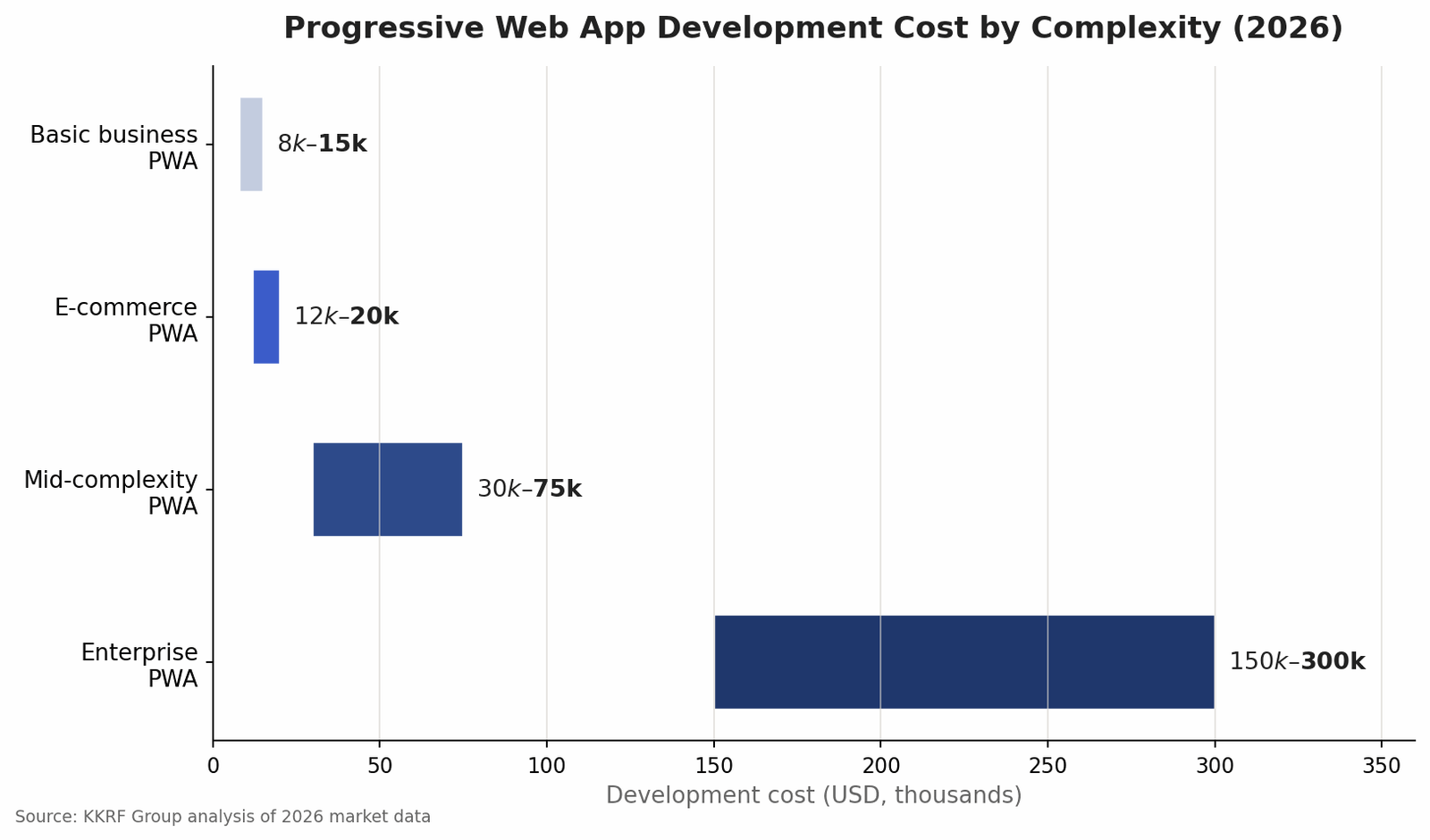
Progressive web app development cost in 2026 typically lands between $8,000 and $300,000, depending almost entirely on scope. A simple business PWA runs $8,000 to $15,000. An e-commerce PWA with catalog, cart, and checkout usually costs $12,000 to $20,000. A mid-complexity product with accounts, integrations, and offline sync sits around $30,000 to $75,000, while a large enterprise platform can exceed $150,000.
These ranges track what we see across the market and in our own KKRF Group estimates. The single biggest cost driver is not technology but feature depth: how much offline capability you need, how many third-party systems you integrate, and how custom the design has to be.
Rates vary by team seniority and location. Senior engineers generally bill $120 to $200 per hour, mid-level developers $70 to $120, and junior developers $40 to $70. A medium-complexity PWA takes roughly 400 to 600 hours of development. Budget another 15 to 20 percent of the build cost per year for maintenance, which covers security patches, dependency updates, and new features.
| PWA Type | Typical 2026 Cost | Timeline |
|---|---|---|
| Basic business PWA | $8,000 – $15,000 | 4 – 8 weeks |
| E-commerce PWA | $12,000 – $20,000 | 8 – 12 weeks |
| Mid-complexity PWA | $30,000 – $75,000 | 3 – 5 months |
| Enterprise PWA | $150,000+ | 6 – 12 months |
One number surprises first-time buyers: a full-featured PWA that would cost $80,000 to $250,000 as a pair of native apps often delivers the same core functionality for a fraction of that, because you fund and maintain one codebase instead of two.
PWA vs Native App: A Cost and Capability Comparison
The PWA versus native decision comes down to reach and cost on one side, and raw device power and store presence on the other. A progressive web app reaches users on any device through a URL and updates instantly. A native app can squeeze more performance out of the hardware and access every platform API, but it costs more and lives behind an app-store gate.
| Factor | Progressive Web App | Native App |
|---|---|---|
| Typical build cost | $25k – $150k (one codebase) | $80k – $400k+ (iOS + Android) |
| Distribution | Instant, via URL | App Store / Play Store review |
| Updates | Instant, server-side | User must update; store approval |
| Offline support | Yes, via service workers | Yes, native |
| Hardware / device access | Broad, improving each year | Full, deepest access |
| Discoverability | Indexed by search engines | App-store search only |
| Best for | Reach, content, commerce, SaaS | Games, heavy hardware, strict compliance |
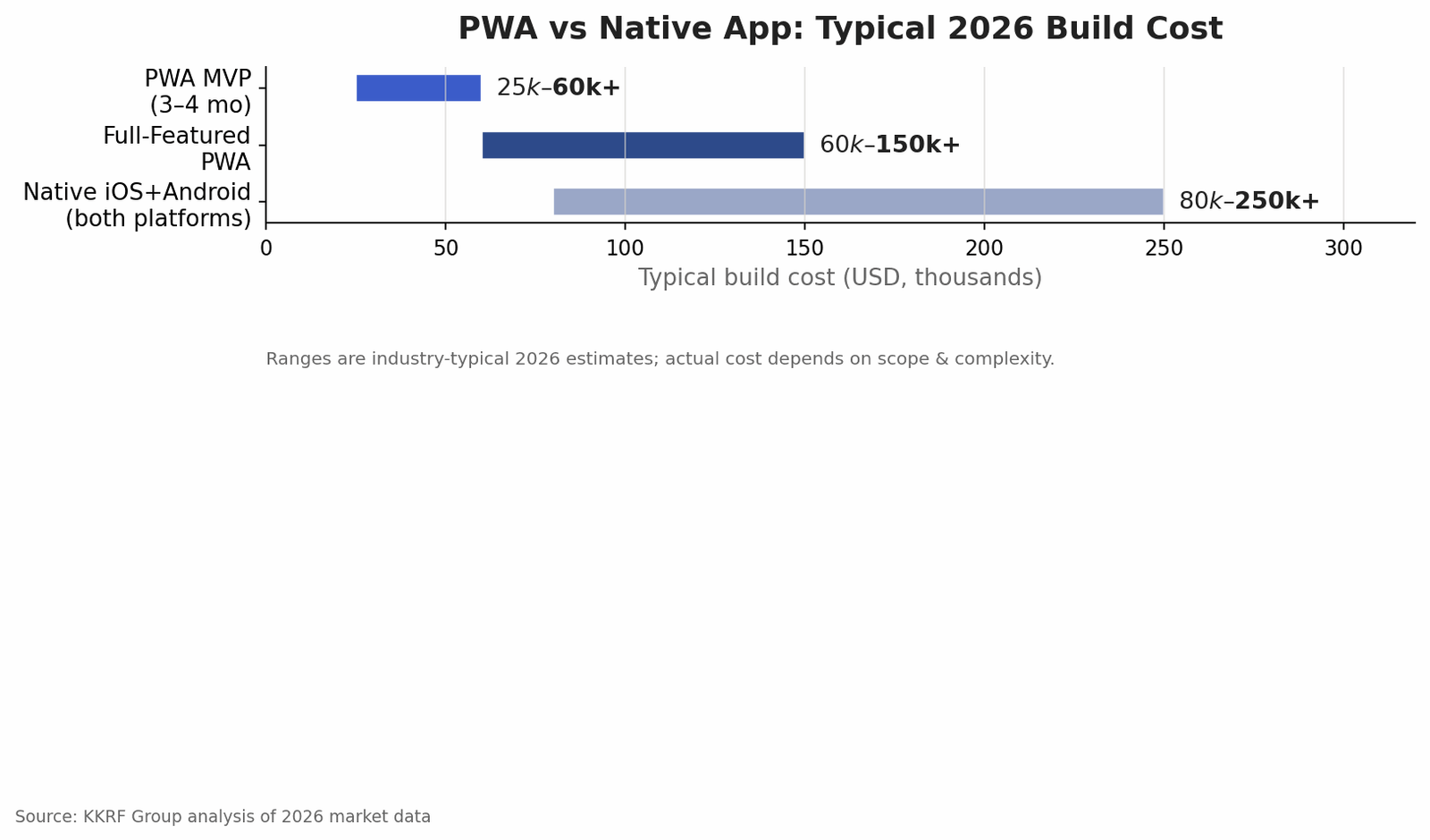
When is native’s extra cost justified? When you need deep, low-latency hardware access, guaranteed peak performance, or platform-specific security such as hardware-backed biometric authentication. Banking apps, regulated healthcare portals, and graphically intense games are the classic cases. For most content, commerce, booking, and productivity products, a PWA delivers the experience users expect at a lower total cost of ownership.
The Core Technology Behind Progressive Web Apps
A service worker is a background script the browser runs separately from the web page. It intercepts network requests, serves cached files, and enables offline access and push notifications. The service worker is what lets a PWA open and function even with no connection.
A web app manifest is a small JSON file that tells the browser how the app should behave when installed: its name, icon, theme color, and whether it launches full screen. Together with HTTPS, which every PWA requires, the manifest is what makes an app installable to the home screen.
For storage, PWAs use the Cache API for files and IndexedDB for structured data, so the app can hold content and user data locally. Tooling matters too. Workbox, a Google library, simplifies service-worker caching strategies, and Lighthouse audits performance, accessibility, and PWA compliance with a measurable score.
On the front end, teams build PWAs with the same frameworks they already use: React, Angular, Vue, or Next.js. There is no exotic stack to learn, which is part of why PWA development is efficient. KKRF Group typically pairs a React or Next.js front end with a cloud-native backend so the app scales cleanly as traffic grows.
Weighing a PWA against a native build for your next product? Our engineers can map your requirements to the right architecture in a short working session. Tell us what you are building and we will show you the fastest path.
Book a Discovery Call →How Progressive Web App Development Works: Step by Step
A PWA project moves through a predictable sequence. Each step below produces a concrete output, which is how you keep a build on time and on budget.
- Discovery and scope. Define the audience, core user journeys, must-have features, and offline requirements. This is where cost is really decided, because scope drives everything downstream.
- UX and UI design. Design the flows and interface for mobile-first use, including how the app behaves when installed and when offline.
- Architecture and tech stack. Choose the front-end framework, backend, hosting, and caching strategy. Set performance budgets before writing code.
- Front-end build. Implement the interface and application logic as a responsive, installable web app.
- Service worker and offline layer. Add the service worker, define caching rules with a tool such as Workbox, and wire up the web app manifest for installability.
- Backend and API integration. Connect authentication, payments, content, and any third-party systems the product depends on.
- Quality assurance and Lighthouse audit. Test across devices and browsers, then run Lighthouse to confirm performance, accessibility, and PWA criteria pass.
- Launch and monitoring. Deploy, submit for indexing, and set up analytics and error monitoring so you can improve the app with real usage data.
Business Benefits and ROI of a Progressive Web App
The clearest benefit is cost. Companies commonly report 40 to 70 percent savings versus native development because they fund one codebase and one team instead of two. Maintenance drops for the same reason.
Reach is the second benefit. A PWA works on any device with a browser, so a single product can serve mobile, desktop, and tablet users. Because there is no download required, more people who land on the app actually use it, which lifts conversion for commerce and lead-generation products.
Speed of iteration is underrated. When you fix a bug or ship a feature, every user gets it instantly, with no app-store review and no waiting for people to update. For teams that release weekly, that alone can justify the model.
Finally, PWAs are discoverable. Search engines index them like any web page, so the same content that drives your SEO also powers your app. Native apps cannot do that. For a growing business, being found in search and installable from the same URL is a real strategic advantage.
Security, Performance, and Compliance
Every PWA runs over HTTPS by default, which encrypts traffic and is a hard requirement for service workers to function. That baseline is stronger than many older web apps, but it is not the whole story.
Because service workers can cache responses, teams have to be deliberate about what gets stored on the device. Sensitive data should not sit unencrypted in a cache, and authentication tokens need careful handling. We follow OWASP guidance on session management and storage, and we scope service workers tightly so they only control the paths they should.
On performance, the discipline is setting Lighthouse budgets early and holding to them. A fast first load and reliable offline behavior are what make a PWA feel native, and both are measurable rather than a matter of opinion.
Compliance is where some products should pause. If you handle regulated health data, card payments, or need hardware-backed security controls, a native build or a hybrid approach may be required. A security-first partner will tell you that up front rather than forcing a PWA where it does not fit.
Common Mistakes in PWA Development
Most PWA projects that disappoint fail for the same handful of reasons. We have seen each of these go wrong on projects that arrived at KKRF Group for a rescue.
- Treating the PWA as an afterthought bolted onto an old site instead of designing for offline and installability from the start.
- Ignoring iOS-specific limitations during planning, then discovering a needed capability behaves differently on Safari.
- Over-caching, so users see stale content and cannot understand why an update did not appear.
- Skipping performance budgets, which lets the app slowly get heavier until the “app-like” feel is gone.
- Neglecting the install experience, so users never get prompted to add the app to their home screen.
- No monitoring after launch, which means real-world offline and performance issues go unnoticed.
When to Choose a PWA (and When Not To)
Use this framework to make the call quickly.
Choose a progressive web app when reach matters more than raw performance, you want one codebase across platforms, search discoverability is valuable, you release often, and your budget favors lower total cost of ownership. Content platforms, e-commerce, booking, SaaS dashboards, and internal tools are strong fits.
Choose native (or hybrid) instead when you need deep hardware integration, guaranteed peak performance, app-store presence for marketing reasons, or platform-specific security and compliance controls. Banking, regulated healthcare, and high-end gaming usually belong here.
Our recommendation: for most business, commerce, and productivity products in 2026, start with a PWA. It gets you to market faster and cheaper, and you can still build a targeted native app later if a specific capability demands it. The reverse, retrofitting web reach onto a native-only product, is far more expensive.
How to Choose a Progressive Web App Development Company
The market is full of vendors who will build “a PWA” without ever committing to the metrics that make one good. A few questions separate a serious partner from the rest.
Ask to see live Lighthouse scores on their past work, not screenshots. Ask how they handle offline state, cache invalidation, and the install prompt, because vague answers there mean the team treats PWA features as optional. Ask about security practices and post-launch support, since a PWA is a living product that needs maintenance.
As a custom engineering company, KKRF Group approaches every PWA with enterprise-grade architecture, a security-first mindset, and a transparent process, so clients can see what they are paying for and why. We build for scale from day one and stay on as a long-term technology partner rather than disappearing at launch.
Ready to scope a real number? Send us your feature list and we will return a clear estimate and a recommended architecture, with no obligation. Request a custom PWA estimate from our engineering team.
Get a Custom Project Estimate →The Future of Progressive Web Apps
The capability gap between PWAs and native apps keeps narrowing. Browser vendors have shipped a steady stream of new web platform APIs for file access, background sync, and hardware features, and installed web apps on iOS gained web push in a recent Safari update. Each release makes the PWA case stronger for more products.
WebAssembly is pushing near-native performance into the browser for compute-heavy work, and on-device AI features are increasingly reachable from web apps. For most businesses, the practical takeaway is simple: the reasons to reach for native are shrinking, and the cost advantage of a well-built PWA is not.
Frequently Asked Questions
How much does progressive web app development cost in 2026?
A basic business PWA costs $8,000 to $15,000, an e-commerce PWA $12,000 to $20,000, a mid-complexity product $30,000 to $75,000, and an enterprise platform $150,000 or more. Scope and feature depth are the main cost drivers.
Is a PWA better than a native app?
It depends on the goal. A PWA is better for reach, faster time to market, and lower cost, since it runs from one codebase and is discoverable in search. A native app is better when you need deep hardware access, peak performance, or strict platform-specific compliance.
How long does it take to build a PWA?
A simple PWA takes about 4 to 8 weeks. A mid-complexity product typically takes 3 to 5 months, and a large enterprise PWA can take 6 to 12 months, depending on integrations and offline requirements.
Do progressive web apps work offline?
Yes. A service worker caches the app shell and key data so a PWA can load and function without a network connection, then sync changes once the device is back online.
Are PWAs good for SEO?
Yes. Because a PWA is built on standard web pages, search engines index it like any website. The same content that supports your SEO also powers the app, which native apps cannot offer.
Can a PWA be installed on iPhone and Android?
Yes. Installable web apps run on Android, iOS, Windows, and macOS. Users add the app to the home screen directly from the browser, with no app store required.
KKRF Group builds fast, secure, installable progressive web apps that reach users everywhere from a single codebase. Whether you are validating an idea or replatforming at enterprise scale, our engineering team can help you ship it right.
Talk to Our Engineering Team →