
Enterprise passwordless authentication has moved from a security aspiration to an operational priority. In 2026 the FIDO Alliance estimates more than 5 billion passkeys are in active use, and roughly 87% of surveyed enterprises have deployed or are actively deploying them for the workforce. Passwords remain the root cause behind most breaches, and attackers have industrialized phishing and credential stuffing. Replacing shared secrets with cryptographic key pairs is now one of the highest-leverage identity decisions an organization can make.
But going passwordless at scale is not a switch you flip. It touches your identity provider, nearly every application, your help desk, your compliance posture, and thousands of users on different devices. This playbook explains what enterprise passwordless authentication actually is, how the technology works, what it costs, how to sequence a migration, and how to avoid the mistakes that stall most rollouts.
Key Takeaways
- What it is: Passwordless authentication replaces shared secrets with FIDO2/WebAuthn key pairs (passkeys), removing the phishing and credential-reuse attacks behind most breaches.
- It is mainstream: Roughly 5 billion passkeys are in use and about 87% of enterprises are deploying them, according to the FIDO Alliance (2026).
- Segment by assurance: Use synced passkeys (NIST AAL2) for the general workforce and device-bound hardware keys (AAL3) for privileged accounts.
- Plan for 8-12 weeks: Most enterprise rollouts run four phases and reach positive ROI within 6-18 months via lower helpdesk and breach costs.
- The hard parts are organizational: account recovery, shared workstations, and legacy apps without WebAuthn support matter more than the cryptography.
What This Playbook Covers
- What Is Enterprise Passwordless Authentication?
- Why Enterprises Are Going Passwordless in 2026
- Synced vs. Device-Bound Passkeys
- How Passwordless Authentication Works
- A Step-by-Step Migration Roadmap
- What Does Passwordless Authentication Cost?
- Security, Compliance and Assurance Levels
- Common Migration Mistakes to Avoid
- Decision Framework: Is It Right for You?
- How to Choose a Passwordless Partner
- Future Trends in Enterprise Authentication
- Frequently Asked Questions
Quick answer: Enterprise passwordless authentication replaces passwords with FIDO2/WebAuthn passkeys, cryptographic key pairs stored on a user’s device or hardware security key. To deploy it at scale, inventory your applications and identity provider, pilot with IT and admins on hardware keys, roll synced passkeys out to the workforce with solid account-recovery flows, then progressively disable password fallback. Most organizations complete a phased migration in 8-12 weeks and reach positive ROI within a year.
As a trusted IT consulting and cybersecurity partner, KKRF Tech helps organizations modernize identity across cloud and hybrid environments, and we have seen firsthand where passwordless programs succeed or stall. The guidance below reflects real deployment considerations, attestation policy, recovery design, and legacy fallback, rather than vendor marketing. Where we cite figures, they come from published FIDO Alliance, NIST, and platform-vendor sources referenced throughout.
What Is Enterprise Passwordless Authentication?
Enterprise passwordless authentication is any workforce sign-in method that verifies identity without a shared secret such as a password or one-time code. Instead, it relies on public-key cryptography: the user proves possession of a private key held securely on their device, while the service stores only the matching public key. There is no secret to phish, guess, reuse, or steal from a server breach.
Passkey. A passkey is a FIDO2 credential, a private/public key pair bound to one website or application. The private key never leaves the user’s authenticator; authentication happens by signing a server challenge, so nothing reusable is transmitted or stored centrally.
FIDO2. FIDO2 is the open authentication standard maintained by the FIDO Alliance and W3C. It combines two specifications: WebAuthn, the browser API that websites call, and CTAP (Client to Authenticator Protocol), which lets a browser talk to an external authenticator such as a phone or security key.
WebAuthn. WebAuthn is the W3C API that lets applications register and verify public-key credentials. It cryptographically binds each credential to the origin domain, which is precisely what makes passkeys resistant to phishing even on a convincing fake login page.
In an enterprise, these standards are usually delivered through your identity provider, such as Microsoft Entra ID, Okta, or Ping, which acts as the relying party and federates passwordless sign-in to downstream applications over SSO protocols like SAML and OpenID Connect.
Why Enterprises Are Going Passwordless in 2026
Enterprises are migrating because passwords have become the most expensive and least secure part of the identity stack. Phishing-resistant passkeys remove the attack that causes most account takeovers, while cutting the help-desk load that password resets generate.
The adoption curve is no longer speculative. The FIDO Alliance estimates roughly 5 billion passkeys are now in use, about 87% of surveyed enterprises have deployed or are actively deploying them, and 75% of consumers have enabled a passkey on at least one account. Analysts project the broader passwordless market to grow from about USD 18.4 billion in 2024 toward USD 86 billion by 2033.
Organizations further along in deployment report concrete gains: 47% cite an improved security posture, 45% faster login times, and 35% lower helpdesk costs. The barriers that remain, shown below, are mostly operational rather than technical, which is good news for teams willing to plan the rollout carefully.
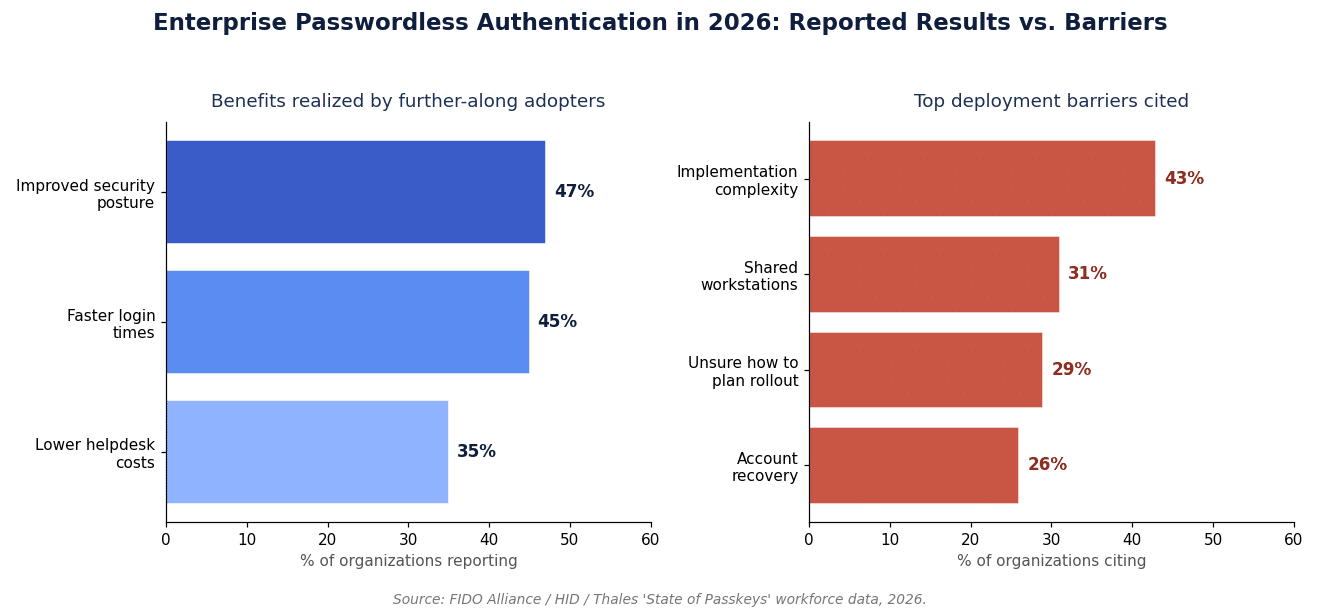
Summary: the security and cost case for passwordless is now backed by real workforce data, and the primary obstacles are things a disciplined migration program can address.
Synced vs. Device-Bound Passkeys
The core architectural choice in every deployment is whether to allow synced passkeys, device-bound passkeys, or both. Synced passkeys copy the encrypted private key across a user’s devices via a platform cloud for convenience; device-bound passkeys never leave the hardware that created them, offering stronger assurance and attestation.
Synced passkey. The private key is generated in a secure module and stored encrypted, then synchronized across the user’s devices through Apple, Google, or Microsoft account backup. This makes recovery easy and meets NIST AAL2, but the sync fabric means no reliable attestation for consumer implementations.
Device-bound passkey. The key is created on and locked to a single authenticator, typically a hardware security key or a platform TPM, and can be cryptographically attested. It supports NIST AAL3 and strict inventory control, at the cost of harder recovery and per-device hardware.
| Factor | Synced passkeys | Device-bound passkeys |
|---|---|---|
| Key storage | Encrypted, synced via platform cloud | Generated and locked to one device or key |
| Assurance level | NIST AAL2 | NIST AAL3 |
| Attestation | Limited or none (consumer sync) | Full, via FIDO Metadata Service (AAGUID) |
| Best for | General workforce, BYOD | Admins, privileged and regulated roles |
| Account recovery | Easy (cloud restore, multi-device) | Harder (backup key or admin reset) |
| Typical cost per user | Low, built into platforms | Higher, roughly $25-70 per hardware key |
Summary: most enterprises adopt a hybrid model, synced passkeys for the general workforce and device-bound keys for privileged access.
How Passwordless Authentication Works
Under the hood, enterprise passwordless authentication is a two-phase public-key ceremony: registration, where a key pair is created and the public key is stored by the relying party, and authentication, where the user signs a fresh challenge with their private key.
Registration (enrolling a passkey)
- Registration request. The application (relying party) sends a challenge and its origin to the browser through the WebAuthn API.
- Key generation. The authenticator, a phone secure enclave, laptop TPM, or hardware security key, creates a new private/public key pair scoped to that origin.
- Attestation (optional). For high-assurance use, the authenticator returns an attestation statement identifying its make and model via its AAGUID, which is checked against the FIDO Metadata Service.
- Public-key storage. The relying party stores only the public key against the user account; the private key never leaves the device.
Authentication (signing in)
- Challenge. On sign-in, the server issues a random challenge bound to its origin.
- User verification. The user unlocks the authenticator with a biometric or PIN. This happens locally; the biometric never leaves the device.
- Signature. The authenticator signs the challenge with the private key and returns the assertion.
- Verification. The server validates the signature against the stored public key and grants access.
Because the signed challenge is bound to the real origin, a phishing site on a look-alike domain simply cannot produce a valid assertion, which is the structural reason FIDO2 defeats scalable phishing.
A Step-by-Step Enterprise Migration Roadmap
Treat the migration as a phased program, not a big-bang cutover. A typical enterprise rollout runs 8-12 weeks across four phases, starting with the highest-risk accounts and ending by retiring password fallback entirely.
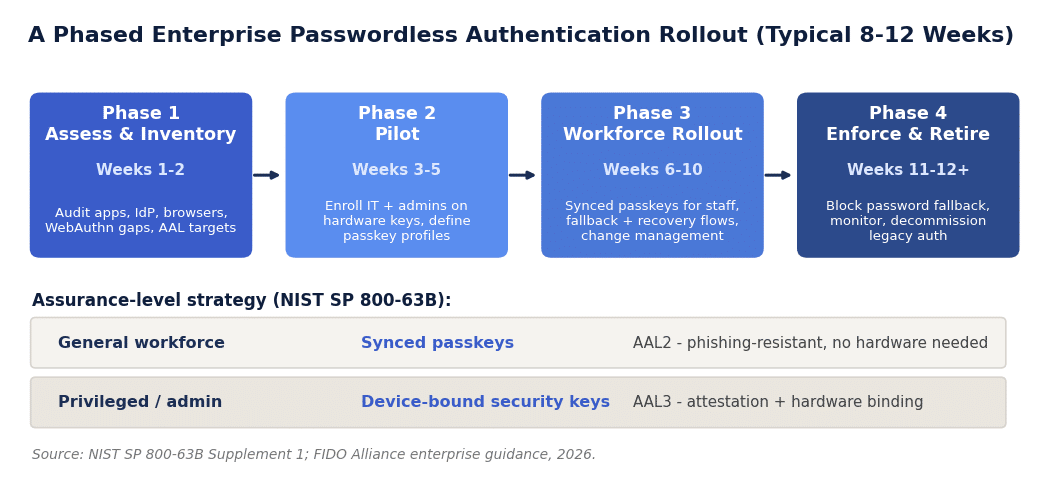
- Assess and inventory (weeks 1-2). Map every application to its authentication method, identify which support WebAuthn natively or through your IdP, catalog browser and device coverage, and set AAL targets per role.
- Pilot (weeks 3-5). Enroll IT staff and administrators first, on device-bound hardware keys. Define passkey profiles, covering attestation, allowed authenticator types, and AAGUID allow-lists, in your identity provider.
- Workforce rollout (weeks 6-10). Enable synced passkeys for general staff, wire up self-service enrollment, and stand up account-recovery and fallback flows before widening access. Pair the technical work with clear change communication.
- Enforce and retire (weeks 11-12+). Turn off password fallback for enrolled populations, monitor sign-in telemetry, and decommission legacy authentication paths.
Rollout best-practice checklist:
- Register at least two credentials per user before enforcement to prevent lockouts.
- Design and test the recovery path in the pilot, not after go-live.
- Give privileged users hardware keys and enforce attestation for those roles.
- Communicate the change with short enrollment guides and helpdesk playbooks.
- Keep a monitored, time-boxed password fallback until coverage is proven.
Summary: sequence by risk, prove recovery early, and only enforce once enrollment and fallback are working.
What Does Passwordless Authentication Cost?
Enterprise passwordless authentication carries a modest direct cost and a large avoided cost. Platform passkeys are effectively free to enable, hardware keys run roughly $25-70 each, and the main investment is engineering and change-management time, usually offset within 6-18 months.
| Cost factor | Typical range | Notes |
|---|---|---|
| Identity platform / licensing | Included to moderate | Passkey support ships in Entra ID, Okta and Ping tiers |
| Hardware security keys | $25-70 per key | Privileged/AAL3 users only, often two keys per user |
| Integration engineering | Weeks of effort | IdP configuration, app updates, recovery flows |
| Change management & training | Variable | Comms, enrollment support, documentation |
| Ongoing support | Low and falling | Fewer password-reset tickets over time |
The offset comes from two directions. Password resets typically account for 20-50% of help-desk ticket volume, and organizations report about 35% lower helpdesk costs after passwordless adoption. Industry estimates put the hidden annual “password tax”, combining reset labor, lost productivity, and breach exposure, in the hundreds of thousands of dollars for large organizations, which is why most passwordless programs pay back well inside two years.
Want a cost and ROI model for your own environment before you commit? KKRF Tech can scope a passwordless program against your actual application estate and identity platform. Explore our cybersecurity consulting services to see how we approach phishing-resistant identity.
Scope My Passwordless Rollout →Security, Compliance, and Assurance Levels
Enterprise passwordless authentication is not just more convenient, it changes your risk and compliance posture. FIDO2 credentials are phishing-resistant by design, and regulators increasingly treat phishing-resistant MFA as the baseline rather than a nice-to-have.
Assurance levels. NIST SP 800-63B defines authenticator assurance levels. Its Supplement 1 recognizes synced passkeys as meeting AAL2, phishing-resistant enough for general workforce use, while device-bound hardware authenticators support AAL3 for privileged and high-value access.
Why phishing resistance matters. Because WebAuthn binds each credential to its origin, stolen credentials cannot be replayed against the real service and cannot be captured by a proxy phishing page. This closes the attack path behind the majority of enterprise account takeovers.
For regulated organizations, phishing-resistant MFA increasingly maps to concrete obligations, from PCI DSS 4.0 authentication requirements to sector rules such as the EU’s DORA for financial entities. Where auditors require verifiable control over which authenticators are in use, attestation and AAGUID allow-lists, available with device-bound passkeys, become important.
Honest trade-offs. Passwordless is not free of limitations. The account-recovery paradox, you cannot reset a private key, must be solved with multi-credential enrollment and secure admin recovery. Consumer synced passkeys provide no attestation, and shared workstations need a deliberate pattern. These are manageable, but they must be designed in, not bolted on.
Common Passwordless Migration Mistakes to Avoid
- Designing recovery last. Rolling out passkeys before building secure account recovery turns a lost device into a lockout and a social-engineering target for the help desk.
- Treating synced and device-bound as interchangeable. Consumer synced passkeys provide no attestation; using them for admin access undercuts an AAL3 requirement.
- Ignoring shared workstations and kiosks. The most-cited enterprise barrier (31%) needs a deliberate pattern such as roaming security keys or hybrid transport.
- Skipping the application inventory. Legacy and vendor apps without WebAuthn support will force password fallback; find them before you promise a passwordless date.
- Enforcing too early. Blocking password fallback before enrollment and recovery are proven strands users mid-workflow and floods the help desk.
- No attestation policy. Without AAGUID allow-lists you cannot guarantee which authenticators are in use, which breaks compliance auditing.
Decision Framework: Is Passwordless Right for You?
Passwordless is the right default for almost every enterprise, but timing and scope should match your environment. Use the framework below to decide where to start and where to wait.
Strong fit, move now:
- High phishing or account-takeover exposure, or a recent credential-based incident.
- A modern identity provider (Entra ID, Okta, Ping) already federating your key apps.
- A regulated industry that needs phishing-resistant MFA to satisfy auditors.
- High password-reset volume weighing down the help desk.
Phase carefully, or wait on parts of the estate:
- Heavy reliance on legacy apps that cannot federate to a modern IdP.
- A large shared-workstation, kiosk, or manufacturing-floor footprint.
- Immature identity governance or device management that should be addressed first.
This is where an experienced partner earns its keep. KKRF Tech treats enterprise passwordless authentication as an identity-governance program, sequencing AAL targets, attestation policy, and recovery design around your actual application estate rather than a generic template. The enterprise recommendation is almost always the same in shape: start with privileged accounts on hardware keys, extend synced passkeys to the workforce, and retire password fallback last.
Summary: nearly everyone should go passwordless, but the sequencing, not the decision, is where programs live or die.
How to Choose a Passwordless Authentication Partner
If you engage a vendor or consultancy, evaluate them on identity depth, not slideware. The right partner has done this across a messy real-world estate, not just a greenfield demo.
- Demonstrated FIDO2/WebAuthn and IdP integration experience (Entra ID, Okta, Ping).
- A concrete account-recovery and shared-workstation strategy, written down.
- Clear mapping of AAL2/AAL3 to your specific compliance obligations.
- A legacy-application migration and fallback plan, not just the happy path.
- Post-rollout monitoring, enforcement, and support, not a hand-off at go-live.
KKRF Tech offers this as part of its IT consulting and cybersecurity practice, and pairs identity modernization with adjacent work such as securing emerging AI and protocol layers that share the same phishing-resistant principles.
Future Trends in Enterprise Authentication
Enterprise passwordless authentication is a direction of travel, not a destination. Several shifts will shape enterprise identity over the next few years.
- Passkey portability. The FIDO Credential Exchange work aims to let users move passkeys between providers, reducing lock-in and easing recovery.
- Attestation for synced keys. Enterprise-grade synced passkeys with stronger provenance signals are emerging to close the current attestation gap.
- Passkey-only accounts. More organizations will drop the password entirely rather than keep it as a dormant fallback.
- AI-accelerated phishing. As attackers use AI to scale convincing lures, origin-bound credentials become even more valuable.
- Post-quantum readiness. Signature algorithms underpinning FIDO2 will migrate to post-quantum schemes as standards mature, so plan for crypto-agility.
Summary: the standards are converging on portable, attestable, password-free identity, and organizations that build a flexible foundation now will adopt each improvement with far less friction.
Not sure whether to start with hardware keys, synced passkeys, or a hybrid model? Bring us your identity stack and compliance obligations, and we will map a phased plan with realistic timelines. Talk to our team about a passwordless readiness assessment.
Book a Passwordless Readiness Review →Frequently Asked Questions
Is enterprise passwordless authentication actually more secure than MFA with passwords?
Yes. FIDO2 passkeys are phishing-resistant because each credential is cryptographically bound to the real site origin, so it cannot be replayed against a fake page or captured by a proxy. Traditional passwords plus one-time codes can still be phished in real time, which is the attack passwordless removes.
What happens if an employee loses their passkey or device?
Recovery depends on your design. Synced passkeys restore automatically to a new device through the platform account, and best practice is to register at least two credentials per user plus a secure admin-driven reset path. In FIDO Alliance surveys, about 89% of organizations report confidence in restoring access when a passkey is lost.
What is the difference between synced and device-bound passkeys?
Synced passkeys copy the encrypted private key across a user’s devices for convenience and meet NIST AAL2, but offer limited attestation. Device-bound passkeys stay locked to one authenticator, support AAL3 and full attestation, and suit privileged or regulated accounts.
How much does passwordless authentication cost to deploy?
Platform passkeys are effectively free to enable, hardware security keys cost roughly $25-70 each for privileged users, and the main spend is integration and change-management time. Most enterprises reach positive ROI within 6-18 months as password-reset tickets and breach exposure fall.
Do passkeys meet compliance requirements like NIST or PCI DSS?
Yes, when mapped correctly. NIST SP 800-63B recognizes synced passkeys at AAL2 and device-bound authenticators at AAL3, and phishing-resistant MFA increasingly satisfies requirements in frameworks such as PCI DSS 4.0 and DORA. Use attestation and AAGUID controls where auditors need verifiable authenticator inventory.
Can we go passwordless if we still run legacy applications?
Yes, through a phased, hybrid approach. Federate what you can to a modern identity provider, keep a monitored password fallback for apps that cannot yet support WebAuthn, and retire those paths as vendors add FIDO2 support. The goal is progressive elimination, not an overnight cutover.
Passwords are the weakest link in most enterprise defenses, and the tooling to replace them is finally mature. Whether you need a strategy, a pilot, or a full workforce rollout, KKRF Tech can help you reach phishing-resistant, passwordless sign-in with confidence.
Start Your Passwordless Journey →