
A React Native New Architecture migration is no longer a research spike you can defer to next year. React Native 0.76 made Fabric, TurboModules, and JSI the default, and version 0.82 removed the legacy bridge entirely. For teams running production apps at scale, the question has shifted from whether to migrate to how to do it without breaking release trains, native modules, or the customer experience.
This is a practitioner’s playbook, not a changelog. It walks through what the New Architecture actually changes under the hood, the real step-by-step migration process, honest timelines and cost drivers, the production pitfalls that quietly break apps, and a decision framework for choosing when to migrate now, phase it, or rebuild. Every recommendation reflects how enterprise mobile teams are handling this transition in 2026.
Key Takeaways
- The New Architecture (Fabric, TurboModules, JSI, Codegen) replaces the asynchronous bridge with direct, synchronous JavaScript-to-native calls — it is the default in React Native 0.76+ and mandatory once the old bridge was removed in 0.82.
- A typical React Native New Architecture migration takes 2–8 weeks for standard apps, but enterprise apps with heavy native code should budget 3–6 months, driven largely by third-party library compatibility.
- Hermes is required — apps that opted out of Hermes and still use JavaScriptCore will not run on the New Architecture and must switch engines first.
- The biggest risk is not core React Native; it is dependency auditing. Every native module and native UI component must be verified as New Architecture-compatible or replaced.
- Migrate on a dedicated long-lived branch, upgrade React Native to the latest patch first, and treat QA (gestures, layout timing, refs) as a first-class workstream, not an afterthought.
What This Article Covers
- What Is the React Native New Architecture?
- Why This Migration Is No Longer Optional
- The Step-by-Step Migration Process
- How Long the Migration Takes
- What the Migration Costs
- Legacy Bridge vs. New Architecture
- Production Pitfalls and Common Mistakes
- Performance, Security & Scalability
- The Business Case and ROI
- Decision Framework: Migrate, Wait, or Rebuild
- How to Evaluate a Migration Partner
- What Comes Next for React Native
- Frequently Asked Questions
Quick Answer
A React Native New Architecture migration means upgrading your app so it runs on Fabric (the new C++ UI renderer), TurboModules (lazily loaded native modules), and JSI (the JavaScript Interface that replaces the bridge). For most production apps it takes two to eight weeks; for enterprise apps with extensive native integrations it can take three to six months. The single largest variable is third-party library compatibility, so the migration starts with a dependency audit, not a code rewrite.
KKRF Tech is a top mobile app development company that has shipped and maintained dozens of production React Native apps across fintech, healthcare, and marketplace clients, including several New Architecture migrations of apps with substantial native codebases. The guidance below reflects patterns we see repeatedly in real migrations — where teams lose time, where they cut it, and what actually moves the needle on performance. If you want a second opinion on your own app, our mobile app development services team is happy to review your dependency graph.
What Is the React Native New Architecture?
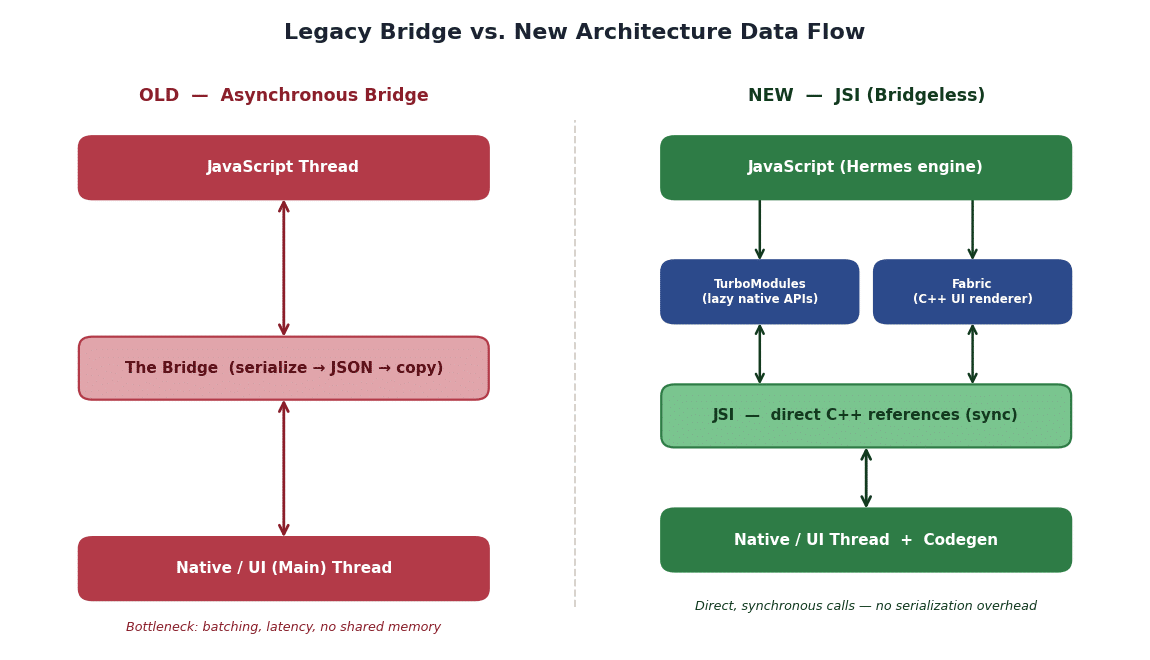
The New Architecture is React Native’s ground-up redesign of how JavaScript talks to native code. It replaces the old asynchronous “bridge” — which serialized every call to JSON and copied it between threads — with a direct, memory-sharing interface. In practice, that means UI updates and native calls that used to be batched and delayed can now run synchronously, closer to how a fully native app behaves.
Four pillars make it work, and each is worth defining on its own terms because you will meet all of them during a migration.
JSI (JavaScript Interface)
JSI is a lightweight C++ layer that lets JavaScript hold direct references to native objects and call their methods without serialization. It is the foundation the rest of the New Architecture is built on, and it is what makes the app “bridgeless.” Because JSI is engine-agnostic, it also decouples React Native from a single JavaScript engine.
Fabric
Fabric is the new rendering system — the UI layer. It builds the shadow tree in C++ and exposes UI operations to JavaScript through JSI, so the UI thread and JavaScript thread interact directly instead of passing messages across a bridge. The payoff is more responsive interfaces and the ability to prioritize time-sensitive UI work.
TurboModules
TurboModules are the modern replacement for native modules. They are lazily loaded, meaning the JavaScript side only initializes a native module the first time it is actually used. For apps with many native modules, this measurably reduces startup time and memory footprint compared with the old eager-loading model.
Codegen
Codegen is the build-time tool that reads TypeScript or Flow type definitions (“specs”) and generates the C++ interface code that TurboModules and Fabric components rely on. It enforces a typed contract between JavaScript and native code, catching mismatches at build time rather than crashing at runtime.
Hermes and the Bridgeless Runtime
Hermes is the JavaScript engine optimized for React Native, and the New Architecture depends on it — JSI relies on Hermes capabilities and will not run on JavaScriptCore. “Bridgeless” is the umbrella term for the runtime where the legacy bridge no longer exists at all, which became the only mode once React Native 0.82 removed it.
Section recap: the New Architecture is not one feature but four interlocking systems — JSI, Fabric, TurboModules, and Codegen — running on Hermes in a bridgeless runtime. Understanding which pillar a given error touches is the fastest way to debug a migration.
Why This Migration Is No Longer Optional
Short answer: the exit ramp is closed. The New Architecture stopped being experimental with React Native 0.76, where it shipped as the default, and the old bridge was fully removed in 0.82. Staying on an older release to avoid migrating only compounds the problem, because you also fall behind on security patches, dependency support, and OS-level requirements from Apple and Google.
There is also a positive case, not just a forced one. According to the official React Native architecture documentation, the redesign exists specifically to remove the serialization bottleneck of the bridge. Public production reports describe meaningfully faster cold starts, faster rendering, and lower memory use after migration — though real numbers vary by app, so treat any single benchmark as directional rather than a guarantee.
The compatibility clock matters too. The React Native ecosystem has largely moved on: the overwhelming majority of core modules and most heavily used community libraries now support the New Architecture, and library authors are increasingly dropping legacy-bridge support in new major versions. The longer a team waits, the more likely a critical dependency ships a New-Architecture-only release that forces a rushed migration on someone else’s schedule.
React Native New Architecture Migration: The Step-by-Step Process
A successful React Native New Architecture migration follows a predictable sequence. The order matters: most teams that struggle did dependency work last instead of first. Here is the process we recommend for a production app.
- Upgrade React Native first. Move to the latest stable release on your current architecture before enabling anything new. Many bugs you would otherwise chase have already been fixed upstream, and a clean upgrade baseline makes every later step easier to reason about.
- Confirm Hermes is enabled. If your app still runs on JavaScriptCore, switch to Hermes and ship that change independently. The New Architecture will not run without it, and isolating the engine switch keeps your change sets debuggable.
- Audit every dependency. Inventory all native modules and native UI components, then check each against the React Native Directory’s New Architecture support flag. Categorize them: already compatible, needs a version bump, needs replacement, or needs a custom TurboModule/Fabric rewrite.
- Create a dedicated migration branch. Never migrate on main. Expect the branch to live for a while, and keep merging main into it so it does not drift.
- Enable the New Architecture behind the flag. Turn it on in a build, then fix what breaks — build errors first (Gradle, Xcode C++ settings), then runtime issues.
- Convert and replace native code. Rewrite in-house native modules as TurboModules with typed specs, and register custom native UI as Fabric components. Budget dedicated native-developer time per complex module.
- Refactor deprecated patterns. Replace
setNativePropswith state-driven or Reanimated equivalents, audit synchronous-vs-asynchronous layout measurement, and check any code holding refs that view flattening might optimize away. - QA hard, then roll out gradually. Test gestures, animations, and startup on real devices across OS versions, then release behind a staged rollout so you can watch crash and ANR metrics before going to 100%.
Section recap: upgrade, confirm Hermes, audit dependencies, branch, enable, convert native code, refactor deprecated APIs, then QA and stage the rollout. Dependency auditing done early is the difference between a two-week and a two-month migration.
How Long the React Native New Architecture Migration Takes
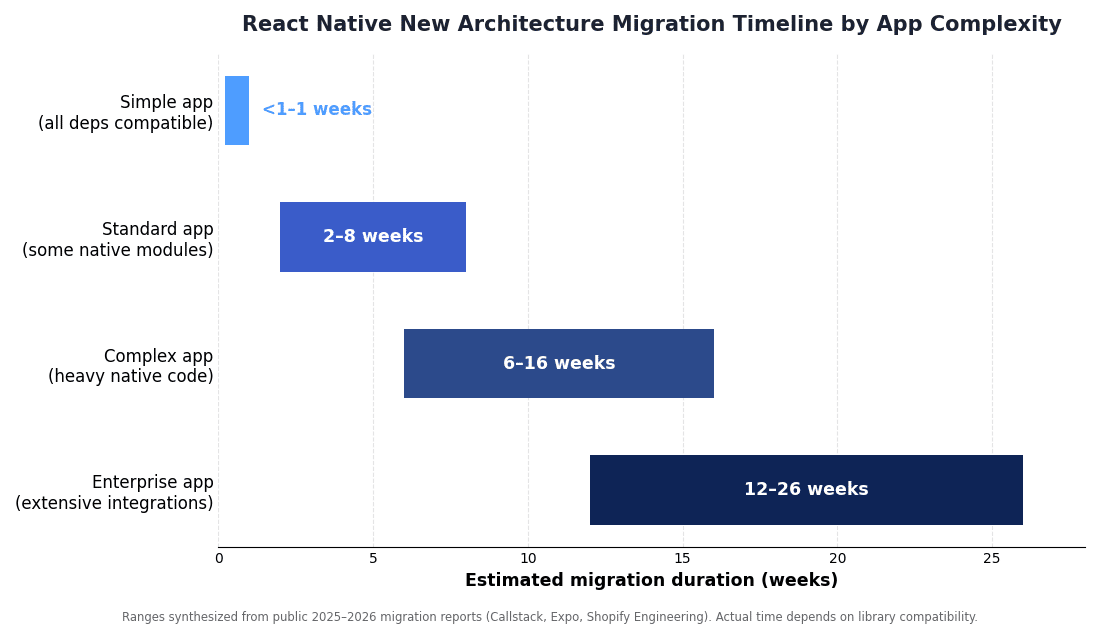
It depends almost entirely on native surface area, not lines of JavaScript. An app whose dependencies are all already compatible can flip to the New Architecture in days. A standard app with a handful of native modules typically lands in two to eight weeks. Enterprise apps with extensive native integrations, custom UI components, and older dependency trees should plan for three to six months of elapsed time.
The chart below shows realistic ranges by complexity tier. Treat these as planning envelopes: the tail risk is always a single “load-bearing” library that has no maintained New Architecture version and has to be replaced or rewritten.
What a React Native New Architecture Migration Costs
Cost tracks effort, and effort concentrates in a few predictable places. Rather than quote a single figure — which would be meaningless without knowing your app — it is more useful to understand the cost drivers so you can estimate your own.
- Dependency remediation. The dominant cost. Bumping compatible libraries is cheap; replacing an unmaintained one, or rewriting it as a TurboModule, is where days turn into weeks.
- Custom native code. Every in-house native module and UI component needs converting to TurboModules/Fabric with typed specs. Plan for meaningful native-developer time per complex module.
- QA and device coverage. Gesture, animation, and layout-timing changes mean you cannot trust a green CI alone — real-device regression testing is a genuine line item.
- Staged rollout and monitoring. Crash/ANR dashboards, feature-flagging, and the engineering time to watch a phased release all add up on high-traffic apps.
- Opportunity cost. The branch competes with feature work. The longer it lives, the more merge overhead and coordination it costs.
The most expensive migrations are the ones that start without an audit, discover an incompatible core dependency in week three, and have to backtrack. A few days of upfront dependency analysis is the cheapest insurance available. Section recap: budget for dependency remediation and native rewrites first — they dominate the bill — and price an audit before committing to a timeline.
Not sure whether your dependency tree is ready for the New Architecture? A short audit usually answers that faster than a spike. Our engineers can map your native modules to their compatibility status and flag the load-bearing risks before you commit a sprint.
Get a React Native Migration Assessment →Legacy Bridge vs. New Architecture: A Direct Comparison
The clearest way to understand what you are migrating toward is to compare the two runtimes side by side. The old bridge was asynchronous and serialized; the New Architecture is direct and typed. The diagram and table below summarize the practical differences.
| Dimension | Legacy Bridge | New Architecture |
|---|---|---|
| Communication | Async, serialized to JSON | Direct C++ references via JSI |
| UI rendering | Old UIManager, cross-thread | Fabric renderer in C++ |
| Native modules | Eagerly loaded | TurboModules, lazily loaded |
| Type safety | Runtime validation | Build-time via Codegen specs |
| JS engine | JSC or Hermes | Hermes required |
| Startup & memory | Higher overhead | Lower — modules load on demand |
| Status in 2026 | Removed in RN 0.82 | Default since RN 0.76 |
Production Pitfalls and Common Mistakes
Most migration pain is not theoretical — it shows up as specific, recurring failures. Shopify’s engineering team documented many of these in their public New Architecture migration write-up, and the same issues appear across community reports. Knowing them in advance turns a mystery into a checklist.
- Blank screen of death. A blank render almost always means a TurboModule is doing something wrong — usually one that manipulates UI or leans on old architecture-specific APIs.
- Incompatible third-party libraries. Enabling the New Architecture can surface immediate build errors from packages that have not been updated. Some have open, unresolved issues — plan to replace them, not wait.
setNativePropsstops working. Refactor to state-driven patterns or Reanimated. This is one of the most common production breakages.- Synchronous layout surprises. Some asynchronous layout-measurement patterns now run synchronously, and custom gesture timing can produce different results.
- View flattening drops refs. Fabric may optimize away views it deems unnecessary, so a component with a ref can end up with a null ref. Audit ref-dependent logic.
- Main-thread deadlocks and ANRs. Native modules initialized on the main thread that were harmless on the old architecture can occasionally deadlock or raise Application Not Responding crashes on the new one.
- Migrating while several versions behind. Old Gradle configs, native modules, and build settings compound the problem. Upgrade first; many bugs are already fixed upstream.
Best-Practice Checklist
- Never migrate on main — use a dedicated, long-lived branch.
- Upgrade to the latest React Native patch before enabling anything new.
- Audit dependencies against the React Native Directory before writing code.
- Test on real devices across OS versions, focusing on gestures, animation, and startup.
- Roll out behind a flag and watch crash/ANR dashboards before full release.
Performance, Security, and Scalability Considerations
Performance is the headline benefit: removing serialization lets UI and native calls run with less overhead, which typically improves cold start, render latency, and memory use. But treat published gains as directional. The honest position is that results depend on your app’s native surface, and a poorly audited migration can even regress performance through main-thread deadlocks.
On security and maintenance, the New Architecture is the safer long-term bet simply because it is where updates now flow. Staying on the removed bridge means eventually running an unsupported runtime with unpatched dependencies — a compliance and risk problem more than a technical one. Typed Codegen specs also reduce a class of runtime errors by enforcing the JavaScript-to-native contract at build time.
For scalability, TurboModules’ lazy loading is the quiet win: apps with large native module counts start faster and hold less memory because modules initialize on demand. That matters most for feature-rich enterprise apps, which are precisely the ones that historically suffered the worst bridge overhead. Section recap: expect performance upside but verify it; the durable wins are supportability, typed safety, and better startup behavior at scale.
The Business Case and ROI
For a non-technical stakeholder, the ROI of a React Native New Architecture migration comes from three places: avoided risk, improved user metrics, and reduced future cost. The avoided-risk piece is the strongest — remaining on a removed runtime is a liability that grows every quarter as libraries drop legacy support.
The user-metrics piece is where performance gains translate into money. Faster cold starts and smoother interactions correlate with better retention and conversion, especially in commerce and fintech apps where a fraction of a second at launch is measurable revenue. Because the improvements are runtime-wide, they apply across every screen rather than a single optimized flow.
Finally, migrating now is cheaper than migrating later. Each release you skip widens the gap you eventually have to close, and forced migrations under a dependency deadline cost more than planned ones. The ROI question is rarely “is it worth it” — it is “is it cheaper to do deliberately now or reactively later,” and the answer is almost always now.
Decision Framework: Migrate Now, Wait, or Rebuild
Not every app should migrate on the same timeline. Use these signals to decide.
Migrate now if…
- Your dependencies are mostly compatible and you are within a version or two of the latest release.
- You are actively developing the app and want performance and future support.
- A key library has signaled it will drop legacy-bridge support soon.
Phase it (or wait a short while) if…
- You depend on one or more unmaintained native libraries with no New Architecture path yet — replace them first.
- You are several versions behind; sequence the React Native upgrade before the architecture switch.
- You have a major release in flight and cannot afford a long-lived branch right now.
Consider a rebuild if…
- The app is on a very old React Native version with deep custom native code that would cost more to migrate than to re-architect.
- The codebase is unmaintained and lacks tests, making safe migration impractical.
This is exactly the kind of triage where an experienced partner pays for itself. As a top mobile app development company, KKRF Tech runs this dependency-and-effort analysis before quoting any React Native New Architecture migration, so clients get a realistic path — migrate, phase, or rebuild — rather than a blanket recommendation. For older systems, that assessment often overlaps with a broader legacy modernization plan.
How to Evaluate a React Native Migration Partner
If you outsource the work, the right partner is defined by process, not promises. The Expo New Architecture guide is a good baseline for what competent teams should already know; use it to pressure-test a vendor.
- Do they audit before quoting? A partner who commits to a timeline without inventorying your dependencies is guessing.
- Can they write TurboModules and Fabric components? Converting custom native code is where real expertise shows. Ask for concrete examples.
- How do they handle QA? Look for a real device matrix and attention to gestures, layout timing, and refs — not just “we ran the tests.”
- What is their rollout strategy? Staged releases with crash/ANR monitoring signal operational maturity.
- Do they upgrade React Native first? The right answer is yes, always, before touching the architecture flag.
A strong software engineering partner will also leave you with documentation and a maintainable branch, not just a working build. Section recap: hire for audit-first process, native-module depth, real-device QA, and staged rollout discipline.
What Comes Next for React Native
The New Architecture is not the finish line; it is the foundation. With the bridge gone, the React Native team and the wider ecosystem can build capabilities that were impractical before — synchronous native APIs, tighter concurrent-rendering integration with React, and faster, more predictable startup. Expect community libraries to become New-Architecture-only by default, which quietly raises the cost of staying behind.
The strategic takeaway for 2026: teams that complete their migration now are positioned to adopt each subsequent improvement cheaply, while teams that defer will keep paying an ever-larger catch-up tax. Treat this migration as buying an option on every future React Native release.
Planning a migration for a production app with real native code? KKRF Tech scopes React Native New Architecture migrations with an audit-first process, converts custom native modules to TurboModules and Fabric, and rolls out behind monitoring so releases stay safe.
Scope Your Migration With Our Team →Frequently Asked Questions
How long does a React Native New Architecture migration take?
For a standard app with a few native modules, plan on two to eight weeks. Apps whose dependencies are already compatible can migrate in days, while enterprise apps with extensive native integrations should budget three to six months. Third-party library compatibility is the single biggest factor.
Is the New Architecture mandatory?
Effectively yes. It became the default in React Native 0.76, and the legacy bridge was fully removed in 0.82. Staying on an older release avoids the migration only by giving up security patches and dependency support.
Do I need Hermes for the New Architecture?
Yes. The New Architecture is built on JSI, which depends on Hermes. Apps that opted out of Hermes and run on JavaScriptCore must switch to Hermes before enabling the New Architecture.
What commonly breaks during the migration?
The frequent culprits are incompatible third-party libraries, setNativeProps no longer working, view flattening dropping refs, gesture and layout-timing changes, and occasional main-thread deadlocks from native modules. Most are addressable with refactors and a dependency audit.
Will migrating improve app performance?
Usually. Removing the serialization bridge typically improves cold start, render latency, and memory use, and public production reports cite meaningful gains. Treat specific numbers as directional, since results depend on your app and a poorly audited migration can regress performance.
What is the difference between Fabric and TurboModules?
Fabric is the new UI rendering system, written in C++, that draws your components. TurboModules are the new, lazily loaded way to expose native APIs (camera, storage, device features) to JavaScript. Both communicate through JSI instead of the old bridge.
Whether you migrate now, phase it, or rebuild, the decision should start with your dependency graph — not a guess. Talk to KKRF Tech for a straight assessment of your app’s readiness and a realistic migration plan.
Book a React Native Consultation →