

Kotlin Multiplatform app development has moved from a promising experiment to a production-grade strategy that enterprises now use to ship iOS and Android apps from one shared codebase. In May 2025, Compose Multiplatform reached stable status on iOS, and KMP adoption among professional developers roughly tripled between 2023 and 2026. This article breaks down the architecture, the real costs, the trade-offs against Flutter, and the specific situations where Kotlin Multiplatform is the right call for an enterprise team.
Key Takeaways
- Shared logic, native performance: Kotlin Multiplatform (KMP) shares business logic — and optionally UI through Compose Multiplatform — across iOS, Android, desktop, and web while compiling to native binaries.
- It is officially stable: JetBrains declared KMP stable in November 2023, Google formally recommends it, and Compose Multiplatform for iOS reached stable status in May 2025.
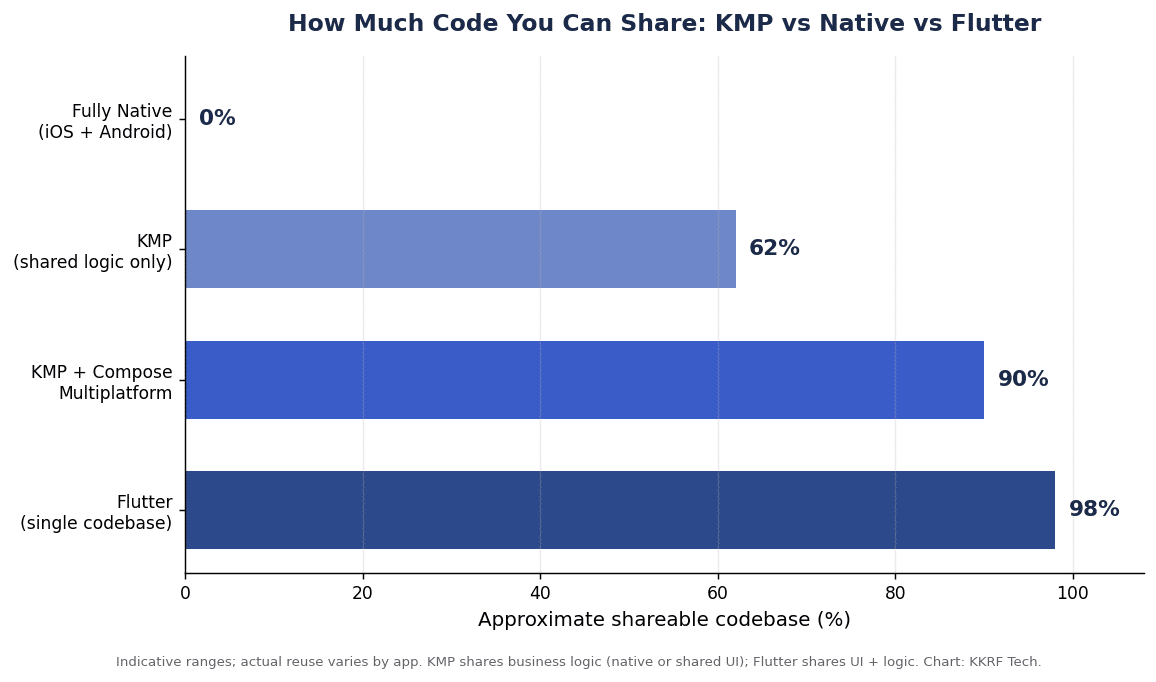
- Real code reuse: Enterprises typically reuse about 60% of code with shared logic and up to 90% when the UI is built with Compose Multiplatform, cutting development effort 30–45% versus fully native builds.
- Proven at scale: Netflix, McDonald’s, Forbes, and Cash App run Kotlin Multiplatform in production for millions of users.
- It is not always the answer: KMP suits native-first, long-lived enterprise apps; Flutter still wins for the cheapest, fastest MVPs with fully uniform UI.
- Decide on fundamentals: team skills, depth of native integration, and product lifespan should drive the choice — not hype.
In This Article
- Quick Answer
- What Is Kotlin Multiplatform?
- Why It Is Gaining Enterprise Traction
- The Shared-Core Architecture
- Kotlin Multiplatform vs Flutter
- Kotlin Multiplatform App Development Cost
- Security, Compliance & Performance
- ROI and the Business Case
- Common Mistakes to Avoid
- Future Trends
- Decision Framework
- How to Evaluate a Partner
- Frequently Asked Questions
Quick Answer: Is Kotlin Multiplatform Right for Your Enterprise?
Choose Kotlin Multiplatform when you want one team writing shared business logic in Kotlin, near-native performance, and deep access to platform APIs — especially if you already maintain a native Android app or your product will live for years. It lets you reuse roughly 60–90% of code while still letting iOS feel like iOS and Android feel like Android. If your priority is instead the fastest, cheapest MVP with a single uniform interface, Flutter is usually the more economical short-term choice.
KKRF Tech, a top mobile app development company, guides enterprise teams through exactly this decision, and our engineers ship production Kotlin Multiplatform modules alongside native iOS and Android UI on real client projects. The guidance below reflects that hands-on delivery experience rather than framework marketing.
What Is Kotlin Multiplatform?
Kotlin Multiplatform is a technology from JetBrains that lets you write code once in Kotlin and compile it to run natively on multiple platforms — Android, iOS, desktop (Windows, macOS, Linux), web, and server. Unlike a wrapper or a bridge, KMP compiles shared Kotlin to native binaries through Kotlin/Native (built on LLVM) for iOS and to JVM bytecode for Android, so there is no interpreter or JavaScript runtime in the hot path.
The core idea is deliberate sharing. You put business logic, data models, networking, and storage in a shared Kotlin module, then either write native UI per platform or share the interface too with Compose Multiplatform. This is why practitioners describe the default pattern as “shared core, native edges.”
Compose Multiplatform, briefly
Compose Multiplatform is JetBrains’ declarative UI framework, built on Jetpack Compose, that renders a single Kotlin-defined interface across Android, iOS, and desktop. On iOS it draws through a hardware-accelerated Metal backend, giving 120Hz ProMotion-smooth animation. It is optional: many enterprise teams share logic with KMP but keep SwiftUI on iOS and Jetpack Compose on Android for maximum platform fidelity. Google documents this shared-logic approach in its Kotlin Multiplatform guidance for Android teams.
Why Kotlin Multiplatform App Development Is Gaining Enterprise Traction
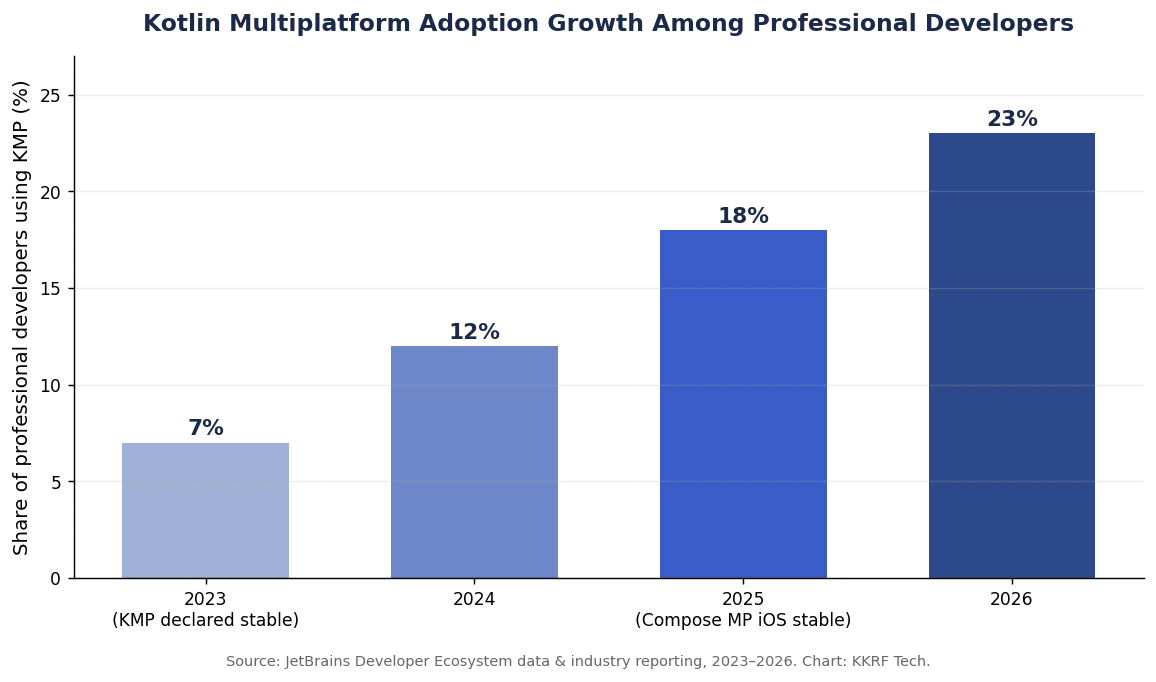
Enterprises are adopting Kotlin Multiplatform app development because it removes duplicated business logic without forcing a compromise on native performance or platform behavior. Adoption among professional developers climbed from roughly 7% in 2023 to 18–23% by 2026 — a rare growth curve for a cross-platform technology, and a strong signal that Kotlin Multiplatform app development has reached production maturity rather than early hype.
The names behind that curve matter for risk-averse buyers. Netflix was the first major company to publicly adopt KMP; McDonald’s rolled it across its global app and reported fewer crashes and better cross-platform consistency; Forbes now ships features simultaneously on both platforms by sharing more than 80% of its logic; and Cash App and Quizlet run it at scale. When a technology carries that kind of production track record, it becomes defensible for an enterprise architecture review.
Section summary: KMP’s enterprise appeal is a single, testable source of truth for logic combined with native UX — the two things large mobile organizations most often struggle to reconcile.
How Kotlin Multiplatform Works: The Shared-Core Architecture
A well-structured KMP app separates what is universal from what is platform-specific. Business rules, API clients, caching, and validation live in shared Kotlin; anything that touches the OS, hardware, or platform look-and-feel stays native or uses KMP’s expect/actual mechanism to declare a shared interface with a platform implementation.
A typical enterprise KMP stack looks like this:
- Shared module (commonMain): domain models, use cases, and business logic written once in Kotlin.
- Networking: Ktor as the multiplatform HTTP client, with kotlinx.serialization for JSON.
- Persistence: SQLDelight for a type-safe, shared local database across iOS and Android.
- Concurrency: Kotlin Coroutines and Flow for asynchronous work and reactive streams on both platforms.
- Dependency injection: Koin or manual DI to wire platform implementations behind shared interfaces.
- UI layer: either native (SwiftUI + Jetpack Compose) or shared (Compose Multiplatform), depending on how much platform fidelity you need.
The expect/actual pattern is the load-bearing concept: shared code declares an expect function or class (for example, secure storage or a location provider), and each platform supplies the actual implementation using Keychain on iOS or EncryptedSharedPreferences on Android. This keeps the shared layer pure while still reaching native capability.
Kotlin Multiplatform vs Flutter
The short version: Flutter shares the entire render layer for maximum code reuse and speed; Kotlin Multiplatform shares logic and lets you keep native UI for maximum platform fidelity. Neither is universally “better” — they make different bets about what “shared” should mean.
| Factor | Kotlin Multiplatform | Flutter |
|---|---|---|
| Language | Kotlin | Dart |
| UI approach | Native UI, or shared via Compose Multiplatform | Single shared UI (own rendering engine) |
| Typical code sharing | ~60% logic; up to 90% with Compose | ~95–98% UI + logic |
| Performance | Near-native (compiles to native binaries) | High, via its own render pipeline |
| Native integration | Direct, first-class | Via platform channels/plugins |
| Time-to-market | Slower initially | Faster for greenfield MVPs |
| Best fit | Native-first, long-lived enterprise apps; existing Android teams | Fast MVPs, uniform brand UI, greenfield |
| Backing | JetBrains + Google |
For apps dominated by forms, lists, and API calls, both frameworks perform equally well. The divergence appears with hardware sensors, real-time data, GPU-heavy rendering, or strict platform-native UX expectations — territory where KMP’s native path is more predictable.
Kotlin Multiplatform App Development Cost
Kotlin Multiplatform app development cost usually lands between fully native and Flutter: higher than a single-codebase Flutter MVP, but meaningfully lower than building and maintaining two separate native apps. Industry practice puts the savings at roughly 30–45% versus fully native, driven by writing business logic once instead of twice.
The ranges below are typical market estimates for a US/Europe engagement; actual figures depend on scope, integrations, compliance, and team location, so treat them as planning bands rather than quotes.
| Project type | Typical scope | Indicative range |
|---|---|---|
| MVP (shared logic, native UI) | Core flows, 1–2 integrations | $30,000–$60,000 |
| Mid-complexity (Compose MP UI) | Shared UI, offline, several APIs | $60,000–$120,000 |
| Complex enterprise | Deep native integration, security/compliance, scale | $120,000–$250,000+ |
Two cost factors are easy to underestimate. First, iOS debugging and tooling in KMP, while much improved, still carries a small productivity tax versus Android. Second, if you adopt Compose Multiplatform for UI, budget for edge cases in accessibility and platform-specific components. Both are manageable, but they belong in the estimate.
Section summary: KMP’s total cost of ownership shines over a multi-year horizon, where a single logic layer keeps maintenance and feature parity cheaper than running two native codebases.
Not sure whether shared logic or a full Compose Multiplatform UI fits your roadmap and budget? Our team can scope a right-sized architecture and give you a realistic estimate. Tell us about your app and we will map the cost trade-offs for your case.
Get a Kotlin Multiplatform Cost Estimate →Security, Compliance & Performance Considerations
Security in KMP is handled where it belongs — natively. Sensitive storage uses the platform’s own primitives through expect/actual: the iOS Keychain and Android’s EncryptedSharedPreferences or the Keystore-backed crypto APIs. Because shared code compiles to native binaries rather than shipping an interpretable bundle, there is no additional runtime attack surface introduced by a cross-platform layer.
For regulated domains — fintech, healthcare, government — KMP’s native-first model is an advantage during audits: certificate pinning, biometric auth, and secure enclaves are the real platform implementations, not abstractions. Teams still own the usual obligations: OWASP Mobile Application Security guidance, data-at-rest and in-transit encryption, and compliance frameworks such as SOC 2, HIPAA, or PCI DSS where relevant.
On performance, Kotlin/Native compiles to machine code, so CPU-bound logic runs at native speed. The main watch-item is Compose Multiplatform on iOS: it is stable and fast for most apps, but very animation-heavy or deeply platform-idiomatic screens can justify native SwiftUI instead. Measure on real devices before committing to a fully shared UI.
ROI and the Enterprise Business Case
The ROI of Kotlin Multiplatform app development comes from eliminating duplicated work, not from cutting corners. When logic lives once, a bug is fixed once, a feature is built once, and both platforms reach parity at the same time — which is often the real business pain that fragmented native teams create.
- Faster feature parity: ship to iOS and Android together instead of one lagging the other by a release cycle.
- Lower maintenance: a single logic layer reduces the surface area for regression and duplicated QA.
- Talent efficiency: Kotlin developers are widely available, and existing Android teams reuse skills immediately.
- Incremental adoption: you can share one module (say, the networking or pricing engine) without rewriting the app, de-risking the investment.
That incremental path is the strongest enterprise argument: KMP does not demand a big-bang rewrite. A pilot that shares a single high-value module produces measurable data on savings before leadership commits to a broader rollout.
Common Kotlin Multiplatform Mistakes to Avoid
Most KMP failures are architectural, not technical. The framework is production-ready; the missteps come from using it in the wrong places or expecting Flutter-style total sharing.
- Forcing a fully shared UI too early: start by sharing logic; adopt Compose Multiplatform for UI only where fidelity allows.
- Ignoring iOS from day one: test on real iPhones early — Android-centric teams often discover iOS tooling gaps late.
- Over-abstracting with expect/actual: keep platform interfaces small and purposeful rather than wrapping everything.
- Underinvesting in accessibility: Compose Multiplatform on iOS needs deliberate accessibility work; do not assume parity with native.
- Choosing KMP for a throwaway MVP: if the app may be discarded in months, Flutter or native prototyping is usually cheaper.
Future Trends in Cross-Platform Development
The trajectory for 2026 and beyond is clear: shared logic is becoming the default and Kotlin Multiplatform app development is moving into the enterprise mainstream, and the debate is narrowing to how much UI to share. Expect Compose Multiplatform for web to leave beta and mature, tighter Kotlin/Native tooling, and continued Google–JetBrains investment that keeps KMP aligned with Android’s roadmap.
- Shared-core becomes standard: most new or migrating apps default to shared logic with native or shared UI.
- Compose Multiplatform on web matures: a genuine three-target (mobile, desktop, web) UI story from one codebase.
- Better iOS interop: smoother Swift interoperability and debugging reduce the remaining friction.
- AI-assisted migration: tooling that helps extract shared modules from existing native apps lowers adoption cost.
Decision Framework: When to Choose Kotlin Multiplatform
Use this framework to decide quickly. Kotlin Multiplatform is the right answer when several of these are true; if the opposite pattern dominates, Flutter or native is the better bet.
Choose Kotlin Multiplatform when:
- You already maintain a native Android app or have Kotlin expertise on the team.
- Native platform behavior and iOS-that-feels-like-iOS matter to your users.
- The app is long-lived and will accumulate complex, shared business logic.
- You need deep hardware, sensor, or security-primitive integration.
- You want to adopt incrementally by sharing one module first.
Lean toward Flutter or native when:
- You need the fastest, cheapest MVP with a single uniform UI.
- The team has no Kotlin background and a hard deadline.
- The product may be short-lived or is a market experiment.
As a top mobile app development company, KKRF Tech generally recommends Kotlin Multiplatform app development for enterprise clients with existing native investment and multi-year roadmaps, and steers greenfield, speed-first MVPs toward Flutter — because matching the framework to the business goal beats defaulting to whichever tool is trending.
How to Evaluate a Kotlin Multiplatform Development Partner
The right partner should demonstrate real Kotlin Multiplatform app development experience, not just Android skills relabeled. Ask pointed questions before you sign.
- Shipped KMP apps: can they show production apps sharing logic across iOS and Android, with references?
- iOS depth: do they have genuine iOS/Swift engineers, or only Android developers touching iOS occasionally?
- Architecture discipline: can they articulate where they would and would not share code for your specific app?
- Testing strategy: how do they test shared modules and platform implementations, including on real iOS devices?
- Incremental plan: will they pilot a single shared module to prove ROI before a full commitment?
Section summary: a credible KMP partner talks in trade-offs and pilots, quantifies where sharing pays off, and treats iOS as a first-class platform rather than an afterthought.
Considering Kotlin Multiplatform for a new build or an existing native app? We can run a low-risk pilot that shares one high-value module and proves the savings before you commit to a broader rollout. Talk to our mobile engineering team.
Start a KMP Pilot Assessment →Frequently Asked Questions
Is Kotlin Multiplatform production ready in 2026?
Yes. JetBrains declared Kotlin Multiplatform stable in November 2023, Google officially recommends it for sharing business logic, and Compose Multiplatform for iOS reached stable status in May 2025. It runs in production at Netflix, McDonald’s, Forbes, and Cash App.
Which companies use Kotlin Multiplatform?
Netflix, McDonald’s, Forbes, Cash App, and Quizlet are among the well-known companies running Kotlin Multiplatform in production. Forbes reports sharing more than 80% of its logic across iOS and Android.
Is Kotlin Multiplatform better than Flutter for enterprise apps?
It depends on priorities. Kotlin Multiplatform suits native-first, long-lived enterprise apps that need deep platform integration and native UX, while Flutter is usually cheaper and faster for greenfield MVPs with a single uniform UI. Enterprises with existing native Android investment often favor KMP.
How much does Kotlin Multiplatform app development cost?
Typical market ranges run from about $30,000–$60,000 for an MVP with shared logic to $120,000–$250,000+ for a complex enterprise app. KMP generally cuts development effort 30–45% versus building two fully native apps, though it can cost more than a single-codebase Flutter MVP.
How much code can you share with Kotlin Multiplatform?
Teams typically share around 60% of code when sharing only business logic, and up to 90% when the UI is also built with Compose Multiplatform. The exact figure depends on how much platform-specific UI and native integration the app requires.
What are the main limitations of Kotlin Multiplatform?
The main trade-offs are iOS tooling and debugging that still trails Android slightly, accessibility work that must be handled deliberately when using Compose Multiplatform on iOS, and limited benefit for very small or short-lived apps. Using shared logic with native UI where it counts avoids most of these issues.
Ready to turn duplicated iOS and Android work into one shared codebase? KKRF Tech designs Kotlin Multiplatform architectures that keep native performance while cutting long-term maintenance. Book a free consultation and get a clear, no-obligation roadmap.
Book Your Free Consultation →